
Formfy vs Typeform 2025: All-in-One Form Builder Guide
Compare Formfy vs Typeform pricing and features. See why businesses choose all-in-one platforms with forms, e-signatures, and scheduling.
Formfy Team
Product & Research
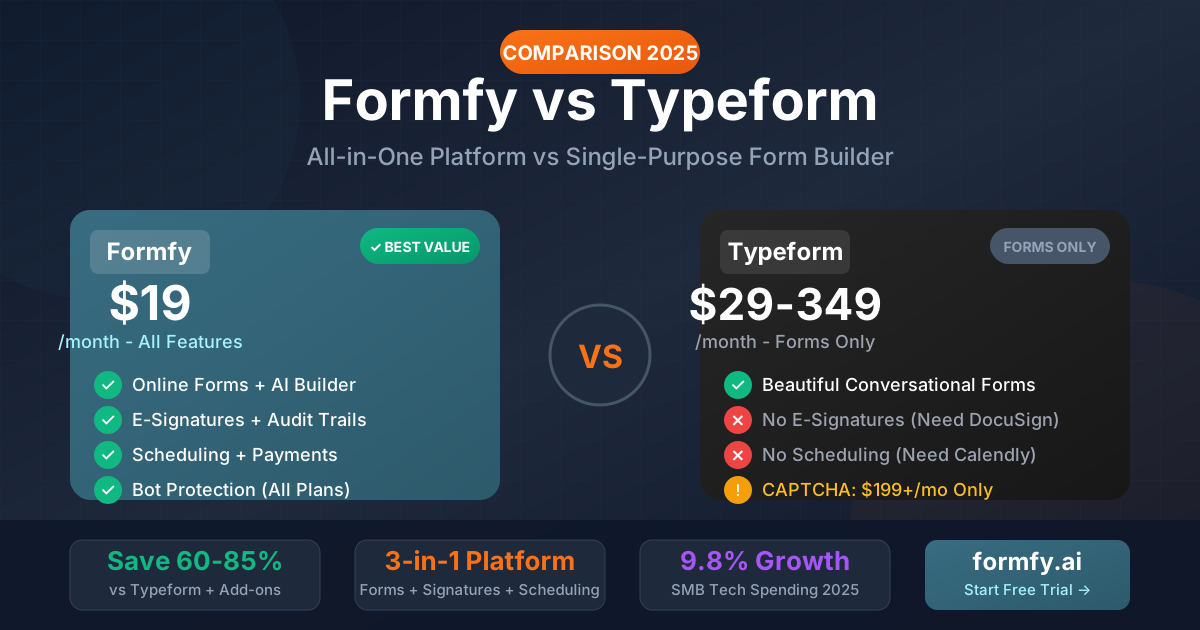
The form builder market has evolved dramatically since Typeform pioneered conversational forms in 2012. What was once innovative—one question at a time, beautiful animations—has become table stakes. Today's small businesses need more than pretty forms; they need complete workflow solutions that don't require a dozen separate subscriptions.
In this comprehensive 2025 comparison, we analyze Typeform's pricing structure, feature limitations, and hidden costs against Formfy's all-in-one approach. If you're evaluating form builders or considering switching from Typeform, this guide provides the data-driven insights you need to make an informed decision.
The State of Online Form Builders in 2025
The online form builder market has matured significantly. According to recent industry analysis, the market is projected to reach $6.8 billion by 2028, growing at 15.3% annually. This growth isn't driven by form building alone—it's powered by integrated platforms that combine forms with related business functions.
Key market trends shaping form builder choices:
- SaaS consolidation: Companies average 350+ software subscriptions, driving demand for unified platforms
- Integration fatigue: IT teams spend 30% of their time managing software integrations
- Security concerns: Each additional tool increases the attack surface and compliance complexity
- Cost consciousness: SMBs scrutinize subscription costs more carefully post-2023
These trends explain why single-purpose tools like Typeform face increasing pressure from all-in-one alternatives.
Typeform Overview: Beautiful Forms at a Premium Price
Typeform revolutionized form design with its conversational interface. Forms that present one question at a time, with smooth transitions and engaging visuals, genuinely improved completion rates when the approach was novel.
Typeform's Core Strengths
- Conversational UX: The one-question-at-a-time approach remains polished
- Design quality: Templates are visually impressive
- Brand recognition: Established name with large user base
- Integration ecosystem: Connects to major platforms
Typeform Pricing Breakdown (2025)
Understanding Typeform's pricing requires careful attention to tiers and limitations:
| Plan | Monthly Cost | Responses/Month | Key Limitations |
|---|---|---|---|
| Basic | $29/month | 100 responses | No logic jumps, limited integrations |
| Plus | $59/month | 1,000 responses | Basic logic, no custom branding removal |
| Business | $99/month | 10,000 responses | Advanced features, no CAPTCHA |
| Enterprise | $199-349+/month | Custom | CAPTCHA available, priority support |
Critical pricing observations:
- Response limits are restrictive: At $29/month, you get just 100 responses—a busy small business could exceed this in a week
- Features are artificially gated: Logic jumps, which competitors include free, require paid plans
- CAPTCHA protection costs $199+: Bot protection, included free in most competitors, requires Enterprise
- Per-response overages: Exceeding limits incurs additional charges
The Hidden Cost of Typeform: Feature Gaps
Typeform excels at form building but stops there. Modern businesses need:
- E-signatures: Typeform has none. You'll need DocuSign ($15-45/user/month) or similar
- Appointment scheduling: No native solution. Add Calendly ($10-20/user/month)
- Payment processing: Limited, requires workarounds
- Document workflows: Non-existent
Total cost example for a 5-person team:
- Typeform Business: $99/month
- DocuSign Essentials: $25/user × 5 = $125/month
- Calendly Teams: $16/user × 5 = $80/month
- Total: $304/month for basic functionality
Formfy Overview: The All-in-One Alternative
Formfy takes a fundamentally different approach: one platform that handles forms, e-signatures, and scheduling together. This isn't feature bloat—it's recognition that these workflows interconnect.
Formfy's Integrated Approach
When a customer fills out a service request form, they often need to:
- Sign a service agreement
- Book an appointment
- Provide payment information
With separate tools, this requires three logins, three integrations, and three potential failure points. Formfy handles it in one flow.
Formfy Pricing Structure
| Plan | Monthly Cost | What's Included |
|---|---|---|
| Free | $0 | 5 forms, 100 responses, basic features |
| Pro | $19/month | Unlimited forms, unlimited responses, all features |
| Business | $49/month | Teams, advanced analytics, priority support |
Key pricing advantages:
- Simple, predictable pricing: No response limits to track or exceed
- All features included: Bot protection, e-signatures, scheduling at every tier
- No per-user fees: One price regardless of team size
- No hidden costs: What you see is what you pay
Feature-by-Feature Comparison
Form Building Capabilities
| Feature | Formfy | Typeform |
|---|---|---|
| Drag-and-drop builder | ✓ | ✓ |
| Conditional logic | ✓ All plans | Plus+ only |
| AI form generation | ✓ | Limited |
| Custom branding | ✓ All plans | Business+ only |
| File uploads | ✓ | ✓ |
| Multi-page forms | ✓ | ✓ |
| Mobile-responsive | ✓ | ✓ |
| Form analytics | ✓ | ✓ |
Analysis: Both platforms handle core form building competently. Formfy's advantage is including all features at every price point, while Typeform reserves features for higher tiers.
E-Signature Capabilities
| Feature | Formfy | Typeform |
|---|---|---|
| Electronic signatures | ✓ Built-in | ✗ None |
| Legally binding (ESIGN/UETA) | ✓ | N/A |
| Audit trails | ✓ | N/A |
| Multi-party signing | ✓ | N/A |
| Signature requests | ✓ | N/A |
| Document templates | ✓ | N/A |
Analysis: This is Formfy's significant advantage. Typeform users needing e-signatures must add DocuSign, HelloSign, or similar—adding $15-45+ per user monthly.
Scheduling Capabilities
| Feature | Formfy | Typeform |
|---|---|---|
| Appointment booking | ✓ Built-in | ✗ None |
| Calendar integration | ✓ | N/A |
| Availability management | ✓ | N/A |
| Booking confirmations | ✓ | N/A |
| Buffer time settings | ✓ | N/A |
| Team scheduling | ✓ | N/A |
Analysis: Another area where Typeform requires external tools. Formfy's built-in scheduling eliminates the need for Calendly, Acuity, or similar.
Security and Compliance
| Feature | Formfy | Typeform |
|---|---|---|
| CAPTCHA/bot protection | ✓ All plans | Enterprise only ($199+) |
| GDPR compliance | ✓ | ✓ |
| Data encryption | ✓ | ✓ |
| SOC 2 compliance | ✓ | ✓ |
| Security posture | Encryption + audit trail + access controls (Formfy not HIPAA-certified) | Enterprise BAA only |
Critical finding: Typeform's CAPTCHA restriction to Enterprise plans is a significant vulnerability for businesses on lower tiers. Bot submissions can corrupt data, waste response allocations, and compromise form integrity.
Payment Integration
| Feature | Formfy | Typeform |
|---|---|---|
| Stripe integration | ✓ Native | ✓ Limited |
| Payment forms | ✓ | ✓ |
| Invoicing | ✓ | ✗ |
| Subscription payments | ✓ | Limited |
Real-World Cost Comparison Scenarios
Scenario 1: Solo Consultant
Requirements: Contact forms, client intake, contract signing, appointment booking
Typeform Stack:
- Typeform Plus: $59/month
- DocuSign Personal: $10/month
- Calendly Pro: $12/month
- Total: $86/month ($1,032/year)
Formfy Solution:
- Formfy Pro: $19/month
- Total: $19/month ($228/year)
Annual savings with Formfy: $804 (78%)
Scenario 2: Small Agency (5 Team Members)
Requirements: Client forms, proposals, contracts, team scheduling, bot protection
Typeform Stack:
- Typeform Business: $99/month
- DocuSign Business Pro: $45 × 5 = $225/month
- Calendly Teams: $16 × 5 = $80/month
- Total: $404/month ($4,848/year)
Formfy Solution:
- Formfy Business: $49/month
- Total: $49/month ($588/year)
Annual savings with Formfy: $4,260 (88%)
Scenario 3: Growing Business (20 Team Members)
Requirements: Enterprise security, covered-entity workflows, unlimited usage
Typeform Stack:
- Typeform Enterprise: $349/month (minimum)
- DocuSign Business Pro: $45 × 20 = $900/month
- Calendly Enterprise: Custom (~$15 × 20 = $300/month)
- Total: ~$1,549/month ($18,588/year)
Formfy Solution:
- Formfy Business: $49/month + volume discount
- Total: ~$99/month ($1,188/year)
Annual savings with Formfy: ~$17,400 (94%)
The Bot Protection Problem: Why Typeform's CAPTCHA Policy Matters
One of Typeform's most criticized limitations is restricting CAPTCHA protection to Enterprise plans ($199+/month). This creates serious problems for businesses on lower tiers:
Bot Spam Impact
- Corrupted data: Bot submissions pollute response data
- Wasted response allocations: Bots can exhaust monthly limits
- Manual cleanup time: Staff must identify and remove fake submissions
- Analytics distortion: Completion rates and metrics become unreliable
Real Business Impact
A marketing agency shared their experience:
"We were on Typeform Business at $99/month. Bots burned through 2,000 of our 10,000 monthly responses. We either had to upgrade to Enterprise at $199+ or switch platforms. Formfy's bot protection on every plan made the decision easy."
Why Formfy Includes Bot Protection Everywhere
Bot protection isn't a premium feature—it's a basic necessity. Formfy includes:
- Honeypot fields (invisible to humans, trap bots)
- Rate limiting
- Behavior analysis
- CAPTCHA options when needed
All of this comes standard on every plan, including free.
Migration: Switching from Typeform to Formfy
If you're considering switching, here's what the migration process looks like:
1. Export Your Data
Typeform allows data export in CSV format. Download responses for all forms you want to migrate.
2. Recreate Forms
Formfy's AI form builder can accelerate recreation:
- Describe your form's purpose
- AI generates initial structure
- Customize styling and logic
- Add signatures and scheduling as needed
3. Update Integrations
Replace Typeform webhooks with Formfy's integrations:
- Zapier compatibility maintained
- Direct integrations available
- API access for custom needs
4. Redirect Traffic
Update embedded forms on your website. Formfy embed codes are similarly simple to implement.
Average migration time: 2-4 hours for most businesses with 5-10 active forms.
When Typeform Might Still Make Sense
Despite Formfy's advantages, certain use cases favor Typeform:
1. Brand Investment
Organizations that have heavily customized Typeform forms and trained teams may find switching costs outweigh savings.
2. Specific Integration Dependencies
Some niche integrations may be Typeform-specific. Verify alternatives before switching.
3. Enterprise Requirements Already Met
If you're already on Typeform Enterprise with negotiated pricing, the cost differential narrows.
4. Pure Form Focus
If you genuinely only need forms—no signatures, no scheduling—and have high volume needs that Typeform's Enterprise pricing accommodates.
What Customers Say: Reviews and Testimonials
Switching Experience
"We switched from Typeform + DocuSign + Calendly to Formfy. Our tech stack went from three platforms to one, and our monthly cost dropped from $180 to $19. The migration took one afternoon." — Sarah M., Business Consultant
Value Recognition
"Typeform's bot protection paywall was the final straw. We were paying $99/month and still getting spam. Formfy's all-inclusive approach makes more sense for small businesses." — Michael R., Marketing Agency Owner
Simplicity Praise
"I don't miss juggling three different dashboards. Formfy handles everything my freelance business needs in one place." — Jennifer L., Freelance Designer
The 2026 Small Business Software Reality
The broader context matters for this comparison. Small businesses in 2026 face:
- Subscription fatigue: Average SMB has 72 SaaS subscriptions
- Integration complexity: 30% of IT time spent on integrations
- Budget pressure: Economic uncertainty drives cost scrutiny
- Efficiency demands: Do more with less is the mandate
Formfy's all-in-one approach directly addresses these challenges. Rather than assembling a stack of single-purpose tools, businesses get integrated functionality at a fraction of the combined cost.
Making Your Decision: Key Questions
Consider these questions when choosing between Typeform and Formfy:
Budget Questions
- What's your total form/signature/scheduling budget?
- How many team members need access?
- Can you absorb per-response overage fees?
Feature Questions
- Do you need e-signatures? (If yes, Formfy advantage)
- Do you need scheduling? (If yes, Formfy advantage)
- Do you need bot protection on non-enterprise plans? (If yes, Formfy advantage)
Workflow Questions
- Would integrated forms+signatures+scheduling improve efficiency?
- How much time do you spend managing multiple tools?
- Are integration failures causing customer friction?
Scale Questions
- Will response limits constrain your growth?
- How will costs scale with your business?
- Does per-user pricing make sense for your team size?
Conclusion: The All-in-One Advantage
The Typeform vs Formfy comparison ultimately comes down to philosophy:
Typeform's approach: Best-in-class conversational forms, but forms only. Need more? Buy more tools.
Formfy's approach: Complete business workflow solution—forms, signatures, scheduling—in one integrated platform.
For most small businesses in 2026, Formfy's approach delivers:
- 60-90% cost savings compared to Typeform + add-ons
- Simplified operations with one platform instead of three
- Complete functionality without premium feature gates
- Bot protection included at every pricing tier
The single-purpose SaaS era is ending. Businesses increasingly choose integrated platforms that respect their time and budget. Formfy represents this shift—providing the complete toolkit modern businesses need without the complexity and cost of assembling it piece by piece.
Frequently Asked Questions
Is Formfy as visually polished as Typeform?
Formfy prioritizes clean, professional design that converts. While Typeform pioneered conversational aesthetics, Formfy's modern interface is equally polished while adding AI-powered form generation and integrated workflows that Typeform lacks.
Can I import my Typeform forms directly?
Direct import isn't available, but Formfy's AI form builder accelerates recreation. Describe your form's purpose, and AI generates the initial structure. Most users recreate forms faster than manual Typeform building.
Does Formfy have response limits like Typeform?
No. Formfy Pro and Business plans include unlimited responses. You'll never worry about overage fees or hitting monthly caps.
How does Formfy's e-signature compare to DocuSign?
Formfy's e-signatures are legally binding under ESIGN Act and UETA—the same legal framework DocuSign uses. You get audit trails, multi-party signing, and compliance features without the separate subscription.
Is Formfy's scheduling as robust as Calendly?
Formfy includes professional scheduling with calendar integration, availability management, buffer times, and booking confirmations. For most businesses, it's feature-complete. Only highly specialized scheduling needs might require dedicated tools.
What about Typeform's integrations? Does Formfy match them?
Formfy integrates with major platforms including Zapier, Google Sheets, Slack, and popular CRMs. While Typeform has a larger integration library due to its age, Formfy covers the integrations most businesses actually use.
Can I try Formfy before committing?
Yes. Formfy offers a free tier with 5 forms and 100 responses—enough to thoroughly test the platform. No credit card required.
What if I need help migrating from Typeform?
Formfy provides migration guides and support. For Business plan customers, the team assists with complex migrations involving many forms or custom configurations.
Does Formfy offer HIPAA compliance?
Formfy implements encryption, audit trail, and access controls. Formfy does not claim HIPAA certification; teams with covered-entity workflows should review their compliance obligations. Typeform restricts BAA to its Enterprise tier.
How does Formfy handle team collaboration?
Formfy Business plan includes team features with shared forms, collaborative editing, and unified analytics. Unlike tools with per-user fees, team size doesn't increase your costs.
Ready to see how Formfy compares for your specific needs? Start your free trial and experience the all-in-one difference—no credit card required.
Related Articles
Formfy Team
Product & Research
Related Articles

Why DocuSign Isn't Built for Waivers: A Better Alternative for Consent and Liability Forms
Learn how to improve docusign alternative for waivers with forms, signatures, and faster workflows. Compare options and start with Formfy.
Best Waiver App for Events and Festivals in 2026: What Event Organizers Actually Need
Learn how to improve best waiver app for events with forms, signatures, and faster workflows. Compare options and start with Formfy.
5 Platforms with Built-In Waivers and Payments for Fitness Events and Bootcamps
Compare 5 platforms that combine liability waivers, payment collection, and registration for fitness events, bootcamps, and pop-up classes in one flow.