
Formfy vs PandaDoc 2026: Complete Comparison Guide for E-Signatures & Document Management
Compare Formfy vs PandaDoc for e-signatures, pricing, and features. See why businesses save up to $5,000+/year switching to Formfy's all-in-one platform.
Formfy Team
Product Team
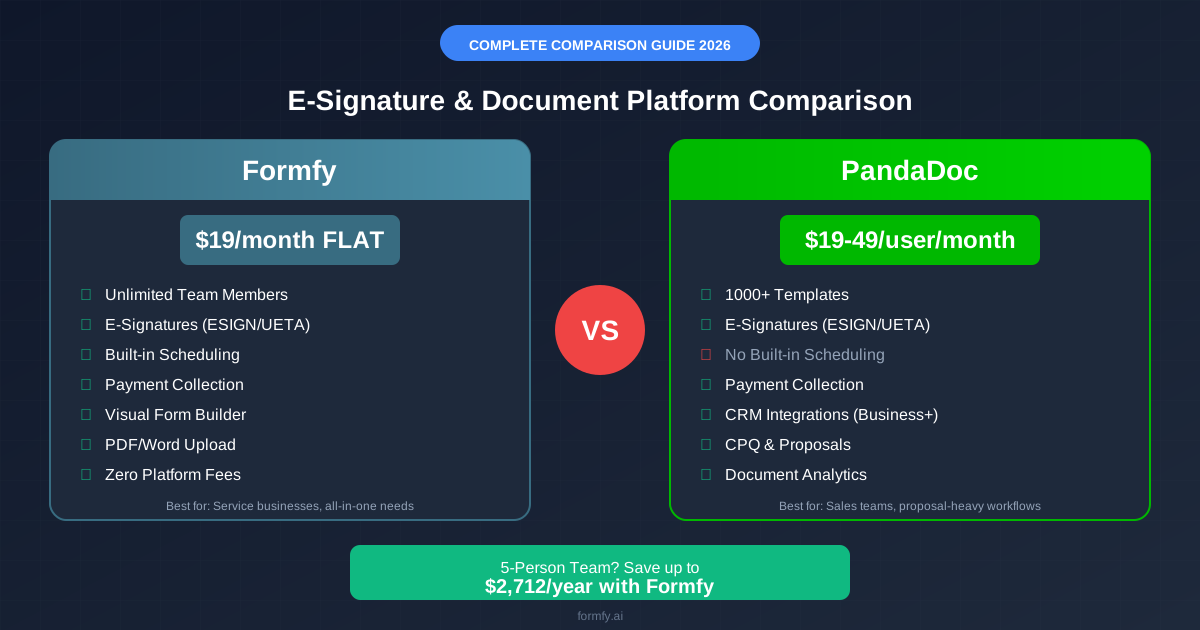
The electronic signature market is booming. Worth over $7 billion in 2025, it's projected to reach $24.5 billion by 2030. With 56% of businesses citing customer expectations as their top driver for adopting digital signatures, finding the right platform has never been more important.
Two platforms frequently compared are Formfy and PandaDoc. While both offer e-signature capabilities, they serve fundamentally different needs and come with vastly different pricing structures. PandaDoc focuses on sales proposals and document automation for mid-market teams, while Formfy provides an all-in-one solution for forms, signatures, and scheduling at a flat monthly rate.
In this comprehensive comparison, we'll break down everything you need to know to make the right choice for your business. Whether you're a solo consultant, a growing service business, or a team looking to streamline operations, this guide will help you understand exactly what each platform offers.
Quick verdict: Formfy is ideal for service businesses, healthcare practices, and teams that need forms, e-signatures, AND scheduling in one affordable platform. PandaDoc is better suited for sales teams that create proposals, need CRM integrations, and benefit from template libraries.
Quick Comparison Overview
| Feature | Formfy | PandaDoc |
|---|---|---|
| Starting Price | $19/month (flat) | $19/user/month |
| Team Members | Unlimited | Per-user pricing |
| E-Signatures | Unlimited | Unlimited (paid) |
| Form Builder | Visual canvas | Document editor |
| Templates | Build custom | 1000+ templates |
| Appointment Scheduling | ||
| Payment Collection | Stripe & PayPal | Multiple options |
| CRM Integration | Webhooks | Native (Business+) |
| CPQ/Proposals | ||
| Document Analytics | Basic | Advanced |
| Free Trial | Yes | 14 days |
What is Formfy?
Formfy is an all-in-one platform that combines form building, electronic signatures, and appointment scheduling into a single, affordable solution. Built for service businesses, healthcare practices, and teams of any size, Formfy offers:
- Visual canvas form builder with drag-and-drop interface and 15+ field types
- Wizard-based step-by-step form creation for guided experiences
- PDF and Word document upload with field overlay for existing documents
- Unlimited e-signatures on all paid plans (ESIGN Act & UETA compliant)
- Multi-signer workflows with custom signing order
- Built-in appointment scheduling with calendar integration and pay-to-book
- Payment collection through Stripe and PayPal with zero platform fees
- Webhooks for automation connecting to your existing tools
- Security-ready infrastructure (encryption, audit trail, access controls) — Formfy does not claim HIPAA or SOC 2 certification
Formfy's pricing is refreshingly simple: $19/month flat for unlimited team members. Whether you're a solo consultant or a 50-person organization, you pay the same price.
What is PandaDoc?
PandaDoc is a document automation platform focused primarily on sales proposals, contracts, and quotes. Founded in 2013 and serving over 56,000 customers worldwide, PandaDoc offers:
- 750-1000+ pre-built templates for proposals, contracts, and agreements
- Drag-and-drop document editor for creating professional documents
- CPQ (Configure, Price, Quote) functionality for sales teams
- Native CRM integrations with Salesforce, HubSpot, Pipedrive, and Zoho
- Document analytics showing page-by-page viewing statistics
- Deal rooms for complex negotiations
- Content library with reusable blocks
- Real-time tracking and notifications
PandaDoc is priced per user: $19/user/month for Starter (annual) or $49/user/month for Business (annual). A 5-person team on the Business plan pays $245/month.
Pricing Deep Dive
This is where the differences become significant and where most businesses make their decision.
Formfy Pricing
Formfy uses flat pricing regardless of team size:
| What You Get | Price |
|---|---|
| Unlimited forms & signatures | $19/mo |
| Unlimited team members | Included |
| Appointment scheduling | Included |
| Payment collection | Zero platform fees |
| All features | One price |
Total monthly cost for any team size: $19
PandaDoc Pricing
PandaDoc uses per-user pricing with tiered features:
| Plan | Monthly (Annual) | Monthly (Monthly) | Key Features |
|---|---|---|---|
| Free eSign | $0 | $0 | 5 documents only |
| Starter | $19/user | $35/user | Unlimited e-signs, templates, 24/7 support |
| Business | $49/user | $59/user | CRM integrations, CPQ, content library |
| Enterprise | Custom | Custom | SSO, API access, advanced automation |
Team Size Cost Comparison
Here's what each platform costs as your team grows:
| Team Size | Formfy (Flat) | PandaDoc Starter | PandaDoc Business | Annual Savings with Formfy |
|---|---|---|---|---|
| 1 user | $19/mo | $19/mo | $49/mo | $0 - $360/yr |
| 3 users | $19/mo | $57/mo | $147/mo | $456 - $1,536/yr |
| 5 users | $19/mo | $95/mo | $245/mo | $912 - $2,712/yr |
| 10 users | $19/mo | $190/mo | $490/mo | $2,052 - $5,652/yr |
| 25 users | $19/mo | $475/mo | $1,225/mo | $5,472 - $14,472/yr |
The math is clear: A 5-person team saves up to $2,712/year with Formfy compared to PandaDoc Business. A 10-person team saves over $5,600/year.
Hidden Costs to Consider
PandaDoc hidden costs:
- Per-user fees multiply quickly as teams grow
- CRM integrations require Business plan ($49/user/month)
- Advanced features locked behind higher tiers
- Additional costs for some integrations
Formfy's approach:
- What you see is what you get
- All features included at $19/month
- No per-user fees ever
- Zero platform fees on payment collection
Feature-by-Feature Comparison
Let's break down each major feature category to see how the platforms compare.
E-Signatures
Both platforms offer legally-binding electronic signatures, but there are nuances:
| Aspect | Formfy | PandaDoc |
|---|---|---|
| Legal Compliance | ESIGN Act & UETA | ESIGN Act & UETA |
| Multi-signer Support | Yes, with signing order | Yes, with signing order |
| Audit Trail | Downloadable PDF | Certificate included |
| Mobile Signing | Fully responsive | Fully responsive |
| Signature Types | Draw, type, upload | Draw, type, upload |
| SMS Reminders | Included | Available |
| Bulk Sending | Yes | Yes |
Verdict: Both platforms deliver legally-binding e-signatures. This is essentially a tie.
Form/Document Building
This is where the platforms diverge significantly:
| Aspect | Formfy | PandaDoc |
|---|---|---|
| Builder Type | Visual canvas, drag-and-drop | Document editor |
| Templates | Build from scratch or upload | 1000+ pre-built templates |
| PDF Upload | Yes, with field overlay | Yes |
| Word Upload | Yes | Yes |
| Field Types | 15+ types | 20+ types |
| Conditional Logic | Not available | Yes (Business+) |
| Content Library | Not available | Yes (Business+) |
Verdict: PandaDoc wins for template users who want ready-made documents. Formfy wins for businesses that prefer building custom forms or already have PDFs/Word documents they want to use.
Scheduling & Appointments
| Aspect | Formfy | PandaDoc |
|---|---|---|
| Built-in Scheduling | Yes | No |
| Calendar Integration | Yes (Google, etc.) | No |
| Pay-to-book | Yes | No |
| Automatic Confirmations | Email & SMS | No |
| Buffer Times | Yes | No |
| Booking Pages | Yes | No |
Verdict: Formfy wins decisively. PandaDoc does not include scheduling at all. If you need appointment booking, you'd need to add Calendly ($12+/month) or another tool on top of PandaDoc.
Payments
| Aspect | Formfy | PandaDoc |
|---|---|---|
| Payment Collection | Yes | Yes |
| Payment Providers | Stripe & PayPal | Stripe, PayPal, Square |
| Platform Fees | Zero | Varies by plan |
| In-form Payments | Yes | Yes |
| Recurring Payments | Via Stripe | Via integrations |
Verdict: Both collect payments well. Formfy's zero platform fees is an advantage for businesses processing significant payment volume.
Integrations & Automation
| Aspect | Formfy | PandaDoc |
|---|---|---|
| CRM Integration | Webhooks only | Native (Salesforce, HubSpot, etc.) |
| API Access | Not available | Enterprise only |
| Webhooks | Yes | Yes |
| Zapier | Via webhooks | Native integration |
| Number of Integrations | Focused set | 30+ native |
Verdict: PandaDoc wins for CRM-heavy workflows. If you need deep Salesforce or HubSpot integration, PandaDoc (Business plan) is the better choice. Formfy's webhooks work well for simpler automation needs.
Analytics & Tracking
| Aspect | Formfy | PandaDoc |
|---|---|---|
| Submission Dashboard | Yes | Yes |
| Document Analytics | Basic status tracking | Advanced (page views, time spent) |
| Real-time Notifications | Yes | Yes |
| Viewer Insights | Not available | Yes |
Verdict: PandaDoc wins with advanced document analytics. This matters most for sales teams who need to see exactly how prospects engage with proposals.
Who Should Choose Formfy?
Formfy is the better choice if you:
Need forms AND signatures in one tool. Formfy combines form building with e-signatures seamlessly. No need to connect separate tools.
Want appointment scheduling included. Book meetings directly through your forms with pay-to-book capability. No extra software needed.
Are a team of any size wanting predictable pricing. Pay $19/month whether you're 1 person or 100. No per-user fees ever.
Prefer building custom forms over using templates. Formfy's visual canvas lets you create exactly what you need, or upload existing PDF/Word documents.
Run a service-based business. Healthcare practices, fitness studios, consultants, coaches, legal firms, and HR departments all benefit from the all-in-one approach.
Value simplicity. One platform, one login, one bill. No complex feature tiers to navigate.
Industries Where Formfy Excels
- Healthcare: Patient intake forms, consent forms, appointment scheduling (encryption, audit trail, access controls; covered entities should verify HIPAA obligations separately)
- Fitness & Wellness: Waivers, membership agreements, class booking
- Legal: Client intake, retainer agreements, document signing
- Real Estate: Buyer/seller forms, disclosure documents, showing appointments
- Consulting: Onboarding forms, contracts, meeting scheduling
- HR: Employee onboarding, policy acknowledgments, interview scheduling
Who Should Choose PandaDoc?
PandaDoc is the better choice if you:
Run a sales-focused operation. PandaDoc is built for creating proposals, quotes, and sales contracts.
Need deep CRM integration. Native Salesforce, HubSpot, and Pipedrive connections on the Business plan.
Benefit from templates. 1000+ ready-to-use templates save time if you're creating proposals frequently.
Want document analytics. See exactly when recipients open documents, which pages they view, and how long they spend.
Use CPQ functionality. Configure, Price, Quote tools help sales teams create accurate proposals quickly.
Need conditional content. Show different content to different recipients based on variables.
Industries Where PandaDoc Excels
- B2B Sales: Proposals, contracts, quotes
- SaaS Companies: Subscription agreements, enterprise deals
- Agencies: Client proposals, scope documents
- Enterprise Sales: Complex multi-stakeholder deals
Real User Perspectives
What PandaDoc Users Say
Positives from reviews:
- "Easy to use for creating proposals" - G2 Review
- "Template library saves significant time" - Capterra Review
- "CRM integration works seamlessly with Salesforce" - TrustRadius Review
Common concerns from reviews:
- "Per-user pricing adds up quickly with growing teams" - G2 Review
- "Customer support quality has declined recently" - Capterra Review
- "Too many features for simple use cases - can be overwhelming" - TrustRadius Review
- "Editing PDFs can feel clunky at times" - G2 Review
What Formfy Users Value
- Simple, predictable pricing with no surprises
- All-in-one convenience (forms + signatures + scheduling)
- No per-user fees regardless of team size
- Easy learning curve without feature overload
- Fast setup for new forms and documents
Migration & Switching Considerations
Questions to Ask Before Switching
-
Do you need templates, or do you build custom documents?
- Templates needed → PandaDoc may be better
- Custom forms preferred → Formfy fits well
-
Is CRM integration critical?
- Deep Salesforce/HubSpot integration needed → PandaDoc Business
- Webhooks sufficient → Formfy works
-
Do you need appointment scheduling?
- Yes → Formfy includes it; PandaDoc requires separate tool
- No → Both work
-
How many team members need access?
- 1-2 users → Similar cost on either platform
- 5+ users → Formfy's flat pricing saves significantly
-
What's your budget?
- $19/month fixed → Formfy
- $100+/month okay → Either platform
Migrating from PandaDoc to Formfy
If you decide to switch:
- Export existing documents from PandaDoc as PDFs
- Upload to Formfy using the PDF upload feature with field overlay
- Add signature fields using Formfy's visual editor
- Configure notifications and webhook integrations
- Update shared links with new Formfy form URLs
- Add team members (remember: unlimited on Formfy)
Most businesses complete migration within 1-2 hours for their core documents.
Conclusion & Recommendation
Both Formfy and PandaDoc are excellent platforms, but they're built for different needs:
Choose Formfy if:
- You need forms, e-signatures, AND scheduling in one platform
- Budget predictability matters (flat $19/month)
- You have a team of any size (unlimited users included)
- You prefer building custom forms over using templates
- You're a service business, healthcare practice, or consultant
- Simplicity and ease of use are priorities
Choose PandaDoc if:
- You're primarily creating sales proposals and quotes
- CRM integration with Salesforce or HubSpot is essential
- You benefit from 1000+ ready-made templates
- Document analytics (viewing behavior) matters
- You need CPQ functionality for complex pricing
- Your team size is small (1-2 users) to minimize per-user costs
For most service businesses, healthcare practices, fitness studios, legal firms, and consultants, Formfy delivers more value at a lower cost. The combination of forms, unlimited signatures, appointment scheduling, and flat pricing simply can't be matched.
For sales-focused teams creating proposals with CRM integrations, PandaDoc's specialized features may justify the higher per-user cost.
Related Articles
Formfy Team
Product Team
The Formfy team is dedicated to simplifying document workflows for businesses of all sizes with our all-in-one platform.
Related Articles

Why DocuSign Isn't Built for Waivers: A Better Alternative for Consent and Liability Forms
Learn how to improve docusign alternative for waivers with forms, signatures, and faster workflows. Compare options and start with Formfy.
Best Waiver App for Events and Festivals in 2026: What Event Organizers Actually Need
Learn how to improve best waiver app for events with forms, signatures, and faster workflows. Compare options and start with Formfy.
5 Platforms with Built-In Waivers and Payments for Fitness Events and Bootcamps
Compare 5 platforms that combine liability waivers, payment collection, and registration for fitness events, bootcamps, and pop-up classes in one flow.