
Formfy vs HelloSign (Dropbox Sign) 2026: Which E-Signature Platform Is Right for Your Business?
Compare Formfy vs HelloSign (Dropbox Sign) pricing, features & limitations. See why businesses save 75%+ switching to Formfy's all-in-one platform in 2026.
Formfy Team
Product Team
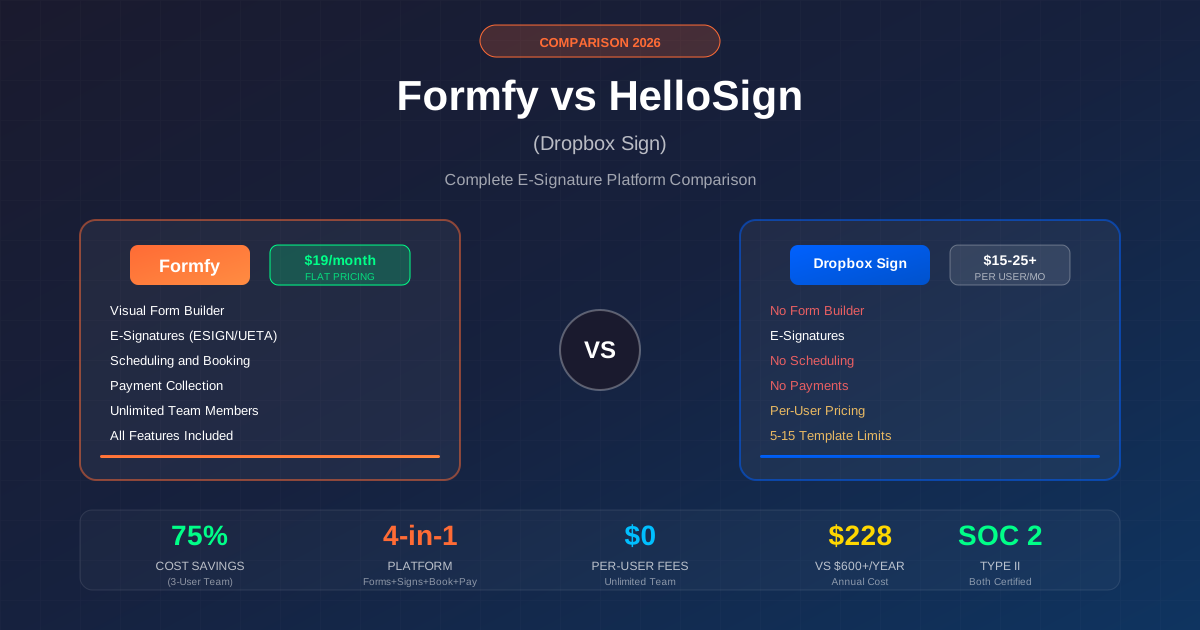
If you're searching for a HelloSign alternative or comparing e-signature platforms in 2026, the landscape has changed dramatically. Dropbox's September 2025 discontinuation of Dropbox Forms left thousands of businesses scrambling for alternatives—and it's raised important questions about the future of single-purpose signature tools.
HelloSign, now officially branded as Dropbox Sign following Dropbox's $230 million acquisition in 2019, remains a solid e-signature solution. But in 2026, businesses are increasingly asking: Do I need just signatures, or do I need a complete document workflow solution?
This comprehensive comparison breaks down everything you need to know about Formfy vs HelloSign (Dropbox Sign)—from pricing and features to real limitations and which platform makes sense for your specific use case.
Quick verdict: Formfy is ideal for small to medium businesses that need forms, e-signatures, scheduling, AND payment collection in one affordable platform (starting at $19/month). HelloSign is better suited for Dropbox-heavy enterprises that only need e-signatures and have existing integrations.
Quick Comparison Table
| Feature | Formfy | HelloSign |
|---|---|---|
| Monthly Price | Starting at $19/month | $15-50+/month |
| Pricing Model | Tiered plans | Per-user |
| Users Included | Unlimited | 1-2 (minimum) |
| Form Builder | ||
| E-Signatures | Unlimited | Unlimited |
| Appointment Scheduling | ||
| Payment Collection | ||
| Templates/Forms | Unlimited | 5-15 max |
| Branding | Included | Standard+ only |
| Audit Trail | ||
| SOC 2 Type II | ||
| Free Trial | 15 days | 30 days |
HelloSign (Dropbox Sign): What You Need to Know
Company Background and Evolution
HelloSign was founded in 2011 by Joseph Walla and Neal O'Mara with a simple mission: make document signing as easy as possible. The platform quickly gained traction for its clean interface and developer-friendly API.
In January 2019, Dropbox acquired HelloSign for $230 million—their largest acquisition to date. The move signaled Dropbox's ambition to expand beyond file storage into document workflows.
Fast forward to October 2022, and HelloSign was officially rebranded to Dropbox Sign, integrating more deeply with the Dropbox ecosystem. Then came September 2025, when Dropbox discontinued Dropbox Forms entirely, leaving users without a native form-building solution.
Current Product Positioning
Today, Dropbox Sign positions itself as an enterprise-grade e-signature solution with deep Dropbox integration. It excels at:
- Seamless Dropbox cloud storage integration
- Clean, intuitive signing experience
- Strong mobile apps (iOS and Android)
- Robust API for developers
- Enterprise compliance (SOC 2, HIPAA, eIDAS)
Who HelloSign Is Best For
HelloSign makes the most sense for:
- Dropbox power users who want tight integration with their existing cloud storage
- Enterprise teams with existing contracts and integrations
- Signature-only workflows where you already have documents created elsewhere
- API-heavy implementations requiring custom integrations
HelloSign Pricing Deep Dive (2026)
Understanding HelloSign's pricing structure is crucial for making an informed decision. Here's the complete breakdown:
Free Plan
- 3 signature requests per month
- 1 user only
- Basic integrations
- No templates
- Limited features
- Best for: Occasional personal use only
Essentials Plan: $15/month
- Billed annually ($20/month if billed monthly)
- 1 user only
- 5 templates maximum
- Unlimited signature requests
- Basic integrations (Google Drive, HubSpot)
- Email support only
What's NOT included:
- No signer attachments
- No in-person signing
- No template links
- No admin console
- No branding customization
- No bulk send
- No SMS authentication
- No SSO
Standard Plan: $25/user/month
- 2-user minimum = $50/month minimum
- Starting at $600/year billed annually
- 15 templates maximum
- Unlimited signature requests
- Signer attachments
- In-person signing
- Template links
- Admin console
- Branding customization
- Bulk send
- Basic reporting
Still NOT included:
- No SSO
- No advanced signer fields
- No data residency options
Premium Plan: Custom Pricing
- 5+ users minimum (contact sales)
- Unlimited templates
- All Standard features plus:
- SSO authentication
- Advanced signer fields (conditional logic, dropdowns)
- Advanced reporting
- Data residency options
- Multi-team management
The Hidden Cost Problem
HelloSign's per-user pricing creates a significant cost multiplier as teams grow:
| Team Size | HelloSign Standard (Annual) | Formfy (Annual) | You Save |
|---|---|---|---|
| 1 user | $300/year* | $228/year | $72 (24%) |
| 3 users | $900/year | $228/year | $672 (75%) |
| 5 users | $1,500/year | $228/year | $1,272 (85%) |
| 10 users | $3,000/year | $228/year | $2,772 (92%) |
*Essentials plan for single user
HelloSign Limitations & User Complaints
Based on verified user reviews and product documentation, here are HelloSign's most significant limitations:
1. No Native Form Building
This is the elephant in the room. HelloSign does not have a form builder. You cannot:
- Create forms from scratch within the platform
- Design custom intake forms or questionnaires
- Build multi-step registration processes
Instead, you must create documents externally (Word, Google Docs, PDF software) and then upload them to HelloSign for signature fields. This adds friction and requires additional tools.
2. No Payment Collection
HelloSign cannot collect payments. Period. If you need clients to pay when they sign a contract or book a service, you'll need:
- A separate invoicing tool
- A payment processor integration
- Manual payment tracking
This is a major gap for service businesses, consultants, and anyone who wants to close deals with a single workflow.
3. No Scheduling or Booking
HelloSign offers zero scheduling functionality. You cannot:
- Let clients book appointments
- Set availability windows
- Send automatic confirmations
- Integrate calendar booking with document signing
For businesses that need both signatures and appointments (consultants, healthcare, real estate), this means maintaining separate tools.
4. Strict Template Limitations
Even on paid plans, HelloSign caps your templates:
- Essentials ($15/month): 5 templates max
- Standard ($25/user): 15 templates max
- Premium (custom pricing): Unlimited
For businesses with diverse document needs, hitting template limits means upgrading to more expensive plans.
5. Per-User Pricing Pain
The Standard plan's 2-user minimum means solo entrepreneurs pay for capacity they don't need. And every additional team member adds $25/month to your bill—costs that compound quickly.
6. Customer Support Concerns
Common complaints from user reviews include:
- Email-only support on lower tiers
- Slow response times
- Difficult cancellation process
- No pro-rata refunds on annual plans
- Complex subscription management
Formfy: The All-in-One Alternative
Formfy takes a fundamentally different approach. Instead of doing one thing well, it combines four essential business tools into a single platform:
Visual Canvas Form Builder
Build professional forms without external tools using Formfy's drag-and-drop interface. Features include:
- 15+ field types: Text, email, phone, dropdowns, checkboxes, file uploads, signatures, payments, and more
- Multi-page forms: Create lengthy registration processes with page breaks
- Conditional logic: Show or hide fields based on responses
- PDF conversion: Upload existing PDFs and add digital fields
- Mobile-responsive: All forms work on any device
Legally Binding E-Signatures
Formfy's e-signatures are fully compliant with the ESIGN Act and UETA. Capabilities include:
- Multiple signature types: Type, draw, or upload signatures
- Multiple signers: Sequential or parallel signing workflows
- Signer authentication: Verify signer identity
- Complete audit trails: Timestamp, IP address, and activity logs
- Certificate of completion: Downloadable proof of signing
Built-in Scheduling & Booking
Unlike HelloSign, Formfy includes appointment scheduling:
- Calendar integration: Sync with your existing calendar
- Availability settings: Define your working hours and days
- Buffer time: Set gaps between appointments
- Automatic confirmations: Email notifications sent automatically
- Multiple appointment types: Offer different services with different durations
Payment Collection
Collect payments directly within your forms:
- Stripe integration: Accept credit cards
- PayPal integration: Additional payment options
- Pay-to-book: Collect payment when scheduling
- Pay-on-submit: Charge when forms are completed
- Zero platform fees: Only pay processor fees
Tiered Pricing Starting at $19/month
Perhaps Formfy's biggest differentiator is its pricing model:
- Starting at $19/month (plans vary by usage)
- Unlimited team members included
- Unlimited forms
- Unlimited submissions
- Unlimited e-signatures
- All features included
- No per-user fees
- No feature tiers
Side-by-Side Feature Comparison
Let's break down specific capabilities across both platforms:
Form Creation
| Capability | Formfy | HelloSign |
|---|---|---|
| Visual form builder | Yes | No |
| Drag-and-drop interface | Yes | No |
| 15+ field types | Yes | N/A |
| Multi-page forms | Yes | N/A |
| Conditional logic | Yes | Premium only |
| PDF field mapping | Yes | Yes |
| Mobile-responsive | Yes | Yes (signing) |
E-Signature Features
| Capability | Formfy | HelloSign |
|---|---|---|
| Typed signatures | Yes | Yes |
| Drawn signatures | Yes | Yes |
| Uploaded signatures | Yes | Yes |
| Multiple signers | Yes | Yes |
| Sequential signing | Yes | Yes |
| Parallel signing | Yes | Yes |
| Audit trail | Yes | Yes |
| ESIGN/UETA compliant | Yes | Yes |
| eIDAS compliant | Yes | Yes |
Scheduling & Payments
| Capability | Formfy | HelloSign |
|---|---|---|
| Appointment scheduling | Yes | No |
| Calendar integration | Yes | No |
| Payment collection | Yes | No |
| Stripe integration | Yes | No |
| PayPal integration | Yes | No |
| Pay-to-book | Yes | No |
Team & Management
| Capability | Formfy | HelloSign |
|---|---|---|
| Team members | Unlimited | Per-user pricing |
| Admin console | Yes | Standard+ |
| Branding | Included | Standard+ |
| Bulk send | Via integrations | Standard+ |
| API access | Yes | Yes |
| Webhooks | Yes | Yes |
Security & Compliance
| Capability | Formfy | HelloSign |
|---|---|---|
| SOC 2 Type II | Yes | Yes |
| SSL/TLS encryption | Yes | Yes |
| HIPAA ready | Yes | Yes (BAA) |
| Data encryption at rest | Yes | Yes |
| Audit logging | Yes | Yes |
Pricing Comparison: Real Cost Analysis
Let's calculate what you'd actually pay in different scenarios:
Scenario 1: Solo Professional
HelloSign Essentials: $180/year
- 1 user
- 5 templates
- E-signatures only
Formfy: $228/year
- Unlimited users
- Unlimited forms
- E-signatures + scheduling + payments
Analysis: HelloSign costs $48 less, but lacks form building, scheduling, and payment collection. Most solopreneurs would need to add:
- Calendly for scheduling: ~$144/year
- Typeform/JotForm for forms: ~$300/year
True HelloSign stack cost: $624+/year vs Formfy: $228/year
Savings with Formfy: $396/year (63% less)
Scenario 2: Small Team (3 Users)
HelloSign Standard: $900/year ($25 x 3 users x 12 months)
Formfy: $228/year (unlimited users included)
Savings with Formfy: $672/year (75% less)
Scenario 3: Growing Business (5 Users)
HelloSign Standard: $1,500/year ($25 x 5 users x 12 months)
Formfy: $228/year
Savings with Formfy: $1,272/year (85% less)
Scenario 4: Scaling Team (10 Users)
HelloSign Standard: $3,000/year ($25 x 10 users x 12 months)
Formfy: $228/year
Savings with Formfy: $2,772/year (92% less)
Who Should Choose HelloSign?
HelloSign remains a solid choice for specific use cases:
Heavy Dropbox Users
If your organization lives in Dropbox, the native integration is genuinely valuable. Documents flow seamlessly between storage and signing without context switching.
Enterprise Teams with Existing Contracts
Large organizations with negotiated enterprise pricing, existing workflows, and sunk integration costs may find switching disruptive. If HelloSign is already embedded in your tech stack, the migration effort may not be worth it.
Signature-Only Needs
If you genuinely only need e-signatures—you create documents elsewhere, don't need scheduling, and handle payments separately—HelloSign's focused approach makes sense.
Specific Integration Requirements
HelloSign's Salesforce enterprise integration and extensive API might be non-negotiable for some workflows. If you've built significant automation around HelloSign's API, switching costs could be substantial.
Who Should Choose Formfy?
Formfy is the better choice for:
Small Businesses Wanting Simplicity
One login, one platform, one bill. No juggling between form builders, signature tools, scheduling apps, and payment processors.
Service Businesses
Consultants, coaches, therapists, fitness trainers, healthcare providers, and anyone who needs clients to fill out forms, sign documents, book appointments, AND pay—all in one flow.
Budget-Conscious Teams
Formfy's tiered pricing starts at $19/month with options for different usage levels. No per-user fees as you grow.
Growing Organizations
Adding team members shouldn't multiply your software costs. Formfy's unlimited users model scales without pricing pain.
Anyone Needing Forms + Signatures + Scheduling + Payments
If you need more than just signatures, Formfy eliminates the need to cobble together multiple tools.
Migration Guide: HelloSign to Formfy
Switching from HelloSign to Formfy is straightforward. Here's how:
Step 1: Export Your Documents
Download copies of your existing templates and signed documents from HelloSign. You'll want these for reference when rebuilding workflows.
Step 2: Create Your Forms in Formfy
Using Formfy's visual canvas builder, recreate your document workflows. Key steps:
- Start with the form builder (no external document creation needed)
- Add your field types: text, dropdowns, checkboxes, etc.
- Include signature fields where needed
- Add booking forms with Stripe or PayPal if collecting fees
- Split long flows across multiple pages for better completion
Step 3: Add Scheduling (If Needed)
Configure your availability settings:
- Set working hours and days
- Define appointment types and durations
- Enable calendar sync
- Customize confirmation emails
Step 4: Connect Payment Processing
Link your Stripe or PayPal account to collect payments directly within forms or at booking time.
Step 5: Onboard Your Team
Invite team members (unlimited on any plan) and set up appropriate permissions.
Timeline Expectations
Most businesses complete migration within 1-2 days. Complex workflows with many templates might take a week. Either way, it's faster than dealing with HelloSign's per-user costs long-term.
Frequently Asked Questions
Is HelloSign the same as Dropbox Sign?
Yes. HelloSign was acquired by Dropbox in 2019 for $230 million and rebranded to Dropbox Sign in October 2022. They are the same platform operating under the Dropbox Sign name.
How much does HelloSign cost per month?
HelloSign pricing starts at $15/month for the Essentials plan (1 user, 5 templates). The Standard plan costs $25/user/month with a 2-user minimum ($50/month minimum). Premium plans require custom pricing for 5+ users.
Does HelloSign have a free plan?
Yes, but it's extremely limited—only 3 signature requests per month for a single user with no templates. It's suitable for occasional personal use only.
Can I build forms in HelloSign?
No. HelloSign (Dropbox Sign) does not have a native form builder. You must create documents externally in applications like Microsoft Word or Google Docs, then upload them to HelloSign for signature collection.
Does HelloSign support payment collection?
No. HelloSign cannot collect payments. You'll need separate invoicing and payment tools to handle financial transactions.
Does HelloSign have scheduling features?
No. HelloSign offers no appointment scheduling functionality. You'd need a separate tool like Calendly for booking.
How many templates can I have in HelloSign?
Template limits vary by plan: 5 templates on Essentials ($15/month), 15 templates on Standard ($25/user), and unlimited templates only on Premium (custom pricing).
Is HelloSign per-user pricing?
Yes. The Standard plan charges $25/user/month with a 2-user minimum. Each additional team member increases your monthly cost.
What happened to Dropbox Forms?
Dropbox discontinued Dropbox Forms on September 30, 2025, leaving users without a native form-building solution within the Dropbox ecosystem.
Are HelloSign signatures legally binding?
Yes. HelloSign (Dropbox Sign) e-signatures are legally binding under the ESIGN Act of 2000 and comply with UETA, eIDAS, and other international regulations.
What is the best HelloSign alternative?
For businesses needing more than just e-signatures, Formfy offers form building, e-signatures, scheduling, and payment collection in one platform starting at $19/month—compared to HelloSign's per-user pricing and signature-only focus.
How do I cancel HelloSign subscription?
HelloSign requires cancellation through account settings or by contacting support. Note that annual plans typically don't offer pro-rata refunds—you'll have access until the billing period ends.
Does Formfy have e-signatures?
Yes. Formfy offers legally binding e-signatures compliant with the ESIGN Act and UETA, including typed, drawn, and uploaded signatures, multiple signers, audit trails, and timestamp verification.
How much does Formfy cost compared to HelloSign?
Formfy starts at $19/month with unlimited users on all plans. A 3-person team can use Formfy for significantly less than HelloSign Standard's per-user pricing.
Can I migrate from HelloSign to Formfy?
Yes. Export your existing documents from HelloSign and recreate your workflows using Formfy's visual form builder. Most businesses complete migration within 1-2 days.
Conclusion & Recommendation
The choice between Formfy and HelloSign comes down to what you actually need:
Choose HelloSign if:
- You're deeply invested in the Dropbox ecosystem
- You have enterprise contracts with negotiated pricing
- You genuinely only need e-signatures
- You've built significant integrations around HelloSign's API
Choose Formfy if:
- You want forms, signatures, scheduling, AND payments in one place
- You're tired of paying per-user fees
- You want predictable pricing as your team grows
- You're a small business, freelancer, or service provider
- You value simplicity over point-solution complexity
For most small to medium businesses, Formfy's all-in-one approach delivers more value at a lower cost. The math is straightforward: why pay $900/year for HelloSign (3 users) plus additional tools for forms, scheduling, and payments when Formfy provides everything for $228/year?
Ready to try the all-in-one alternative? Start your free 15-day Formfy trial—no credit card required.
Formfy Team
Product Team
The Formfy team is dedicated to simplifying document workflows for businesses of all sizes with our all-in-one platform.
Related Articles

Why DocuSign Isn't Built for Waivers: A Better Alternative for Consent and Liability Forms
Learn how to improve docusign alternative for waivers with forms, signatures, and faster workflows. Compare options and start with Formfy.
Best Waiver App for Events and Festivals in 2026: What Event Organizers Actually Need
Learn how to improve best waiver app for events with forms, signatures, and faster workflows. Compare options and start with Formfy.
5 Platforms with Built-In Waivers and Payments for Fitness Events and Bootcamps
Compare 5 platforms that combine liability waivers, payment collection, and registration for fitness events, bootcamps, and pop-up classes in one flow.