
Formfy vs Calendly 2025: All-in-One vs Scheduling Only
Compare Formfy vs Calendly for scheduling. See pricing, features, and why businesses prefer all-in-one platforms with forms and e-signs.
Formfy Team
Product Team
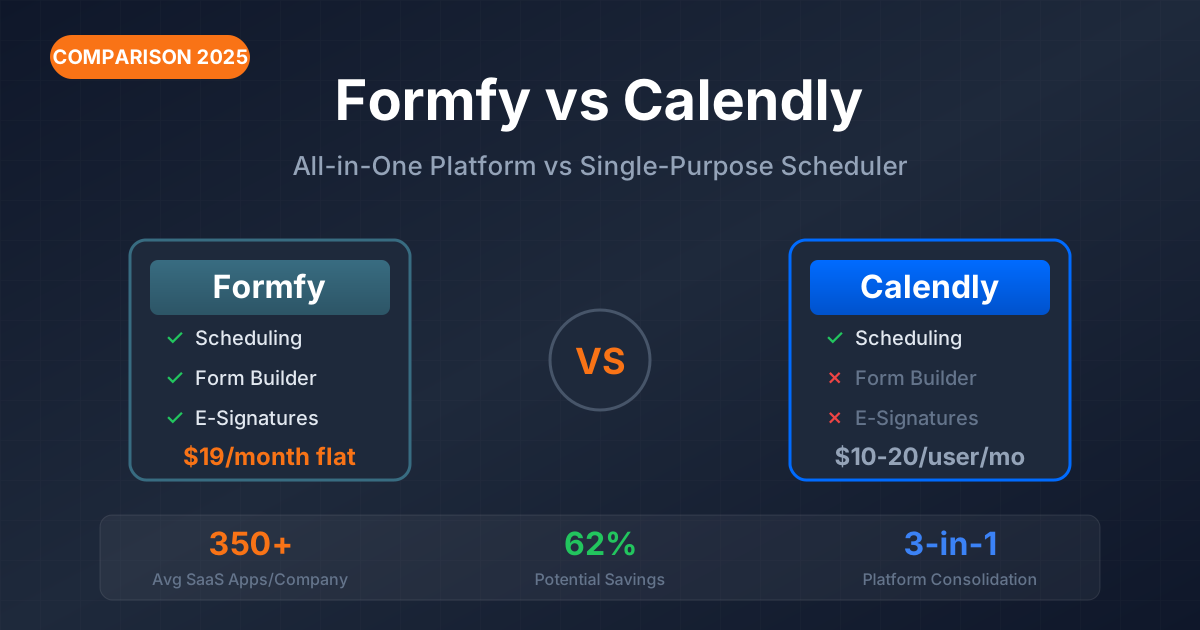
In 2026, businesses are drowning in software subscriptions. The average company now uses 350+ SaaS applications, and CFOs are demanding consolidation. If you're comparing Formfy vs Calendly for appointment scheduling, you're asking the right question—but you might be asking the wrong question entirely.
The real question isn't "which scheduler is better?" It's "do I need another single-purpose tool, or can I consolidate?"
This comparison breaks down exactly what each platform offers, what it costs, and—crucially—which approach makes more sense for your business in the era of SaaS consolidation.
Quick Comparison: Formfy vs Calendly at a Glance
| Feature | Formfy | Calendly |
|---|---|---|
| Starting Price | $19/month (flat) | $10/user/month |
| Pricing Model | Flat monthly | Per-user |
| Appointment Scheduling | ✓ | ✓ |
| Form Builder | ✓ Full builder (15+ field types) | ✗ Limited intake questions |
| E-Signatures | ✓ Legally binding with audit trails | ✗ Not available |
| PDF/Document Processing | ✓ | ✗ |
| Payment Collection | ✓ Stripe | ✓ Stripe/PayPal |
| Multiple Calendar Sync | ✓ | ✓ (paid plans) |
| Custom Branding | ✓ | ✓ (paid plans) |
| Team Scheduling | ✓ | ✓ (paid plans) |
| Webhooks/Integrations | ✓ | ✓ |
| SMS Notifications | ✓ | ✓ (paid plans) |
| Waivers & Agreements | ✓ | ✗ |
| Audit Trail | ✓ | ✗ |
The quick verdict: Calendly excels at one thing: scheduling. Formfy does scheduling AND forms, e-signatures, document processing, and waivers in one platform. For businesses that need more than just meeting booking, Formfy eliminates the need for multiple subscriptions.
What Is Calendly?
Calendly is the market leader in appointment scheduling, and for good reason. Founded in 2013, the Atlanta-based company has built an incredibly polished tool focused purely on one thing: making it easy to book meetings.
What Calendly does well:
- One-click meeting scheduling with a clean, intuitive interface
- Calendar integrations (Google, Outlook, iCloud, Office 365)
- Round-robin and collective scheduling for teams
- Automated reminders and follow-up workflows
- Embeddable booking widgets for websites
- CRM integrations (HubSpot, Salesforce on higher tiers)
- Group event scheduling
What Calendly doesn't do:
- Full form building (only basic intake questions)
- E-signatures or legally-binding document signing
- Document processing (PDF uploads, fillable forms)
- Liability waivers or contracts
- Comprehensive data collection beyond scheduling context
Calendly is excellent at its core function. If all you need is meeting scheduling, it's a strong choice. The question is whether "all you need" is actually all you need.
What Is Formfy?
Formfy is an all-in-one platform combining forms, e-signatures, and scheduling in a single tool. Rather than doing one thing, it consolidates three common business functions.
Core capabilities:
Form Builder
- AI-assisted wizard for quick form creation
- Visual canvas builder with drag-and-drop for advanced customization
- 15+ field types including signatures, file uploads, dates, dropdowns
- Multi-page support for complex forms
- Conditional logic for dynamic forms
E-Signatures
- Legally-binding digital signatures (ESIGN Act and UETA compliant)
- Timestamp and IP address logging
- Multiple signers with status tracking
- Audit trail PDFs with complete signing history
Appointment Scheduling
- Availability settings and calendar management
- Custom event durations (15, 30, 60 min, or custom)
- Automatic confirmations and reminders
- Payment collection via Stripe integration
Document Processing
- Upload PDF or Word documents
- Convert to fillable forms
- Add signature fields to existing documents
- Maintain original document formatting
Distribution & Automation
- Shareable links and custom URLs
- Email and SMS sharing
- QR codes for physical locations
- Website embedding
- Webhooks for Zapier, Make, n8n, Slack, Discord
Calendly Pricing Breakdown (2025)
Understanding Calendly's pricing requires understanding their per-user model.
Calendly Plans
| Plan | Monthly (per user) | Annual (per user) | 5-Person Team (Annual) | 10-Person Team (Annual) |
|---|---|---|---|---|
| Free | $0 | $0 | $0 | $0 |
| Standard | $12 | $10 | $600/year | $1,200/year |
| Teams | $20 | $16 | $960/year | $1,920/year |
| Enterprise | Custom | ~$42 | Custom | $15,000+ minimum |
What's Included at Each Tier
Free Plan:
- 1 event type only
- 1 calendar connection
- Basic scheduling functionality
- Calendly branding on booking pages
- No automated reminders
- No integrations beyond calendar
Standard Plan ($10-12/user/month):
- Unlimited event types
- 2 calendar connections
- Remove Calendly branding
- Automated email reminders
- Group events
- Payment integrations (Stripe, PayPal)
- Basic reporting
Teams Plan ($16-20/user/month):
- Round-robin scheduling
- Salesforce integration
- Lead routing and assignment
- Team admin features
- Collective scheduling (book with multiple team members)
- Advanced analytics
Enterprise ($15,000+ annually):
- Minimum 30 users required
- SSO/SAML authentication
- Microsoft Dynamics integration
- Dedicated account management
- Custom security requirements
The Per-User Cost Reality
Calendly's per-user pricing means costs scale linearly with your team:
| Team Size | Standard (Annual) | Teams (Annual) |
|---|---|---|
| 1 person | $120/year | $192/year |
| 5 people | $600/year | $960/year |
| 10 people | $1,200/year | $1,920/year |
| 25 people | $3,000/year | $4,800/year |
And remember: this is just for scheduling. No forms. No signatures. No document processing.
Formfy Pricing Breakdown (2025)
Formfy uses a flat pricing model rather than per-user pricing.
Key difference: One price covers your entire team—not per seat.
What's Included
Starting at $19/month, Formfy includes:
- Full form builder with AI-assisted wizard and visual canvas
- Appointment scheduling with reminders and availability management
- E-signatures with audit trails and timestamp logging
- PDF/Word document processing
- Multiple sharing options (link, email, SMS, QR code, embed)
- Submission management with CSV and PDF export
- Webhook integrations for Zapier, Make, n8n, Slack, Discord
- Payment collection via Stripe
Check current pricing at formfy.ai/pricing for plan details.
The Consolidation Math
Instead of paying for:
- Calendly ($10-20/user/month)
- PLUS a form builder like Typeform ($25+/month)
- PLUS an e-signature tool like DocuSign ($15+/month)
You get all three in Formfy for a flat monthly fee.
Cost Comparison: Real-World Scenarios
Let's run the numbers for common business situations.
Scenario 1: Solo Consultant
A consultant who needs to schedule client meetings, collect intake information before calls, and get contracts signed.
| Need | Calendly Stack | Formfy |
|---|---|---|
| Scheduling | Calendly Standard: $10/mo | Included |
| Client intake forms | Typeform Essentials: $25/mo | Included |
| Contract signatures | HelloSign: $15/mo | Included |
| Monthly Total | $50/month | $19/month |
| Annual Total | $600/year | $228/year |
| Annual Savings | — | $372 (62%) |
Scenario 2: 5-Person Service Team
A small team that books client appointments, collects pre-session information, and handles service agreements.
| Need | Calendly Stack | Formfy |
|---|---|---|
| Team scheduling | Calendly Teams (5 users): $80/mo | Included |
| Intake forms | JotForm Bronze: $39/mo | Included |
| E-signatures | SignNow Business: $20/mo | Included |
| Monthly Total | $139/month | $19/month |
| Annual Total | $1,668/year | $228/year |
| Annual Savings | — | $1,440 (86%) |
Scenario 3: Fitness Studio
A fitness business that books classes, collects liability waivers, and handles member onboarding forms.
| Need | Calendly Stack | Formfy |
|---|---|---|
| Class booking | Calendly Standard: $10/mo | Included |
| Liability waivers | SmartWaiver: $20/mo | Included |
| Member forms | Google Forms: $0 (limited) | Included |
| Monthly Total | $30/month | $19/month |
| Annual Total | $360/year | $228/year |
| Annual Savings | — | $132 (37%) |
Scenario 4: Real Estate Agent
An agent who schedules showings, collects buyer representation agreements (now required post-NAR settlement), and handles document signatures.
| Need | Calendly Stack | Formfy |
|---|---|---|
| Showing scheduling | Calendly Standard: $10/mo | Included |
| Buyer agreements | DocuSign Personal: $10/mo | Included |
| Client intake | Typeform: $25/mo | Included |
| Monthly Total | $50/month | $19/month |
| Annual Total | $600/year | $228/year |
| Annual Savings | — | $372 (62%) |
Feature Deep Dive: Where Each Platform Shines
Where Calendly Wins
1. Pure Scheduling Excellence
Calendly has been refining scheduling since 2013. The result is an incredibly polished experience:
- Interface is intuitive and clean
- Calendar integrations are rock-solid
- Booking flow is optimized for conversion
- Mobile experience is seamless
If scheduling is genuinely your only need, Calendly's focus shows.
2. Enterprise Features
For large organizations, Calendly offers capabilities Formfy doesn't:
- Salesforce lookup and lead routing
- SSO/SAML for enterprise security
- Microsoft Dynamics integration
- Dedicated account management
- Advanced round-robin with weighted distribution
3. Brand Recognition
"Send me your Calendly" has become common business language. Recipients are familiar with the interface, and the brand carries trust with enterprises.
4. Advanced Team Routing
Calendly's team features are robust:
- Round-robin with customizable logic
- Lead distribution by territory or criteria
- Collective scheduling (book with multiple team members simultaneously)
- Pool-based booking for support teams
Where Formfy Wins
1. All-in-One Value
The core advantage: one platform replaces several:
- Forms + Signatures + Scheduling
- No juggling multiple logins
- Unified data in one dashboard
- Simpler vendor management
2. Document Workflow
Formfy handles document needs Calendly can't:
- Upload existing PDFs or Word documents
- Add signature fields to any document
- Complete audit trails for legal compliance
- Process contracts, waivers, agreements
3. Predictable Pricing
Flat pricing vs. per-user pricing makes a significant difference:
- Costs don't scale with team size
- Easier budgeting and forecasting
- No surprise overages
- Better for growing teams
4. Legal Documentation
For businesses needing signed agreements:
- Legally-binding e-signatures (ESIGN Act compliant)
- Audit trails with timestamps and IP addresses
- Multiple signer support
- Waivers, contracts, consent forms
5. Comprehensive Data Collection
Beyond scheduling intake:
- 15+ field types
- File uploads
- Conditional logic
- Multi-page forms
- Complex form workflows
Use Case Analysis: Which Platform Is Right for You?
Choose Calendly If:
You only need meeting scheduling If booking meetings is genuinely your only digital need, Calendly's focused approach makes sense.
You already have form and e-signature tools you're happy with If you're committed to your current stack and just need to add scheduling, Calendly integrates well.
You need enterprise features SSO, Salesforce lookup, and advanced routing are Calendly territory.
Brand recognition matters for your audience Some enterprise clients specifically expect Calendly links.
You have complex team routing needs Calendly's round-robin and collective scheduling features are more advanced.
Choose Formfy If:
You need scheduling AND forms AND/OR e-signatures If you need more than one of these functions, consolidation saves money and complexity.
You're actively consolidating your software stack If your CFO is pushing for fewer tools, Formfy eliminates multiple subscriptions.
You want predictable pricing Flat pricing means your costs don't explode as you add team members.
You collect waivers, contracts, or agreements Any business requiring signed documents benefits from built-in e-signatures.
You need comprehensive intake before appointments Complex forms with file uploads, signatures, or multi-page flows go beyond Calendly's intake questions.
You're a small-to-medium business watching costs The per-user vs. flat pricing difference matters most at this scale.
Industry-Specific Recommendations
| Industry | Recommendation | Primary Reason |
|---|---|---|
| B2B Sales Teams | Calendly Teams | CRM integrations, lead routing |
| Fitness/Wellness | Formfy | Waivers + class booking in one |
| Consultants | Formfy | Client intake + scheduling + contracts |
| Healthcare | Formfy | HIPAA forms + scheduling + consent |
| Real Estate | Formfy | Contracts + signatures + showings |
| Recruiters | Calendly Teams | Interview scheduling focus |
| Legal | Formfy | Engagement letters + scheduling |
| Enterprise Sales | Calendly Enterprise | Advanced routing, Salesforce integration |
| Agencies | Formfy | Client onboarding + project kickoffs |
The 2026 SaaS Consolidation Case
The context for this comparison matters. We're not in 2019 anymore.
The Tool Sprawl Problem
According to industry research:
- The average enterprise uses 350+ SaaS applications
- License waste averages $21 million annually per large organization
- Knowledge workers toggle between apps 1,200 times daily
- This app-switching costs approximately 4 hours of productivity weekly
The Consolidation Movement
In 2026, business software purchasing has fundamentally shifted:
- New SaaS purchases dropped from 20% to 8% year-over-year
- Spending on consolidating tools grew 8% in the same period
- CFOs are actively auditing redundant subscriptions
- "Point solution fatigue" is driving platform preference
What This Means for Scheduling Decisions
The question isn't just "which scheduler is better?" It's:
- Do I already have a tool that could handle this?
- What's the total cost including per-user scaling?
- Am I solving a problem or adding complexity?
- Could one platform handle multiple needs?
Before adding Calendly (or any single-purpose tool), consider whether an all-in-one platform better serves both your immediate needs and your consolidation goals.
Migration Considerations
Moving from Calendly to Formfy
What transfers easily:
- Booking page concept (recreate in Formfy scheduling)
- Event types (recreate as appointment types)
- Availability settings (configure in Formfy)
What requires work:
- Historical booking data (doesn't automatically transfer)
- Active scheduling links (need to update across channels)
- CRM integrations (reconfigure via webhooks)
Recommended approach:
- Set up Formfy scheduling alongside existing Calendly
- Test with a subset of clients or internal meetings
- Gradually migrate booking links on your website, email signature, etc.
- Monitor for issues during overlap period
- Decommission Calendly after successful transition
Moving from Multiple Tools to Formfy
If you're currently using Calendly + a form builder + an e-signature tool:
- Inventory current forms - List all forms in use and their purpose
- Recreate in Formfy - Use PDF upload for existing documents or rebuild in form builder
- Set up scheduling - Configure appointment types with integrated forms
- Configure webhooks - Replace Zapier connections with native webhooks
- Update distribution - Change links, embeds, and shares to Formfy
- Cancel redundant subscriptions - Once fully migrated, eliminate old tools
Frequently Asked Questions
Conclusion: The Right Tool for the Right Need
The Formfy vs Calendly comparison ultimately comes down to what your business actually needs.
If scheduling is your only digital need: Calendly remains the category leader with polished features, broad integrations, and enterprise recognition.
If you need more than scheduling: Formfy offers forms, e-signatures, and scheduling in one platform—potentially replacing 2-3 separate subscriptions at a lower total cost.
The 2026 trend is clear: businesses are consolidating software, not adding more single-purpose tools. Before committing to another subscription, consider whether an all-in-one platform better serves your needs, your budget, and your sanity.
Ready to consolidate your scheduling, forms, and e-signatures?
Formfy combines everything you need in one platform—appointment scheduling, form building, and legally-binding e-signatures—starting at just $19/month.
Start Free Trial | Compare Pricing | See All Features
Related comparisons: Formfy vs DocuSign | Formfy vs SmartWaiver
Formfy Team
Product Team
Related Articles

Why DocuSign Isn't Built for Waivers: A Better Alternative for Consent and Liability Forms
Learn how to improve docusign alternative for waivers with forms, signatures, and faster workflows. Compare options and start with Formfy.
Best Waiver App for Events and Festivals in 2026: What Event Organizers Actually Need
Learn how to improve best waiver app for events with forms, signatures, and faster workflows. Compare options and start with Formfy.
5 Platforms with Built-In Waivers and Payments for Fitness Events and Bootcamps
Compare 5 platforms that combine liability waivers, payment collection, and registration for fitness events, bootcamps, and pop-up classes in one flow.