
Formfy vs Adobe Sign: The Complete 2026 Comparison Guide
Compare Formfy vs Adobe Sign for e-signatures. See pricing, features, and why Formfy offers better value for small business in 2026.
Formfy Team
Product Team
If you're searching for an Adobe Sign alternative or trying to decide between Formfy and Adobe Sign for your e-signature needs, you've come to the right place. This comprehensive comparison breaks down everything you need to know about both platforms—from pricing and features to real-world use cases and hidden costs.
By the end of this guide, you'll have a clear understanding of which solution best fits your business needs, budget, and growth plans.
Quick Summary: Formfy vs Adobe Sign at a Glance
Before diving into the details, here's the bottom line:
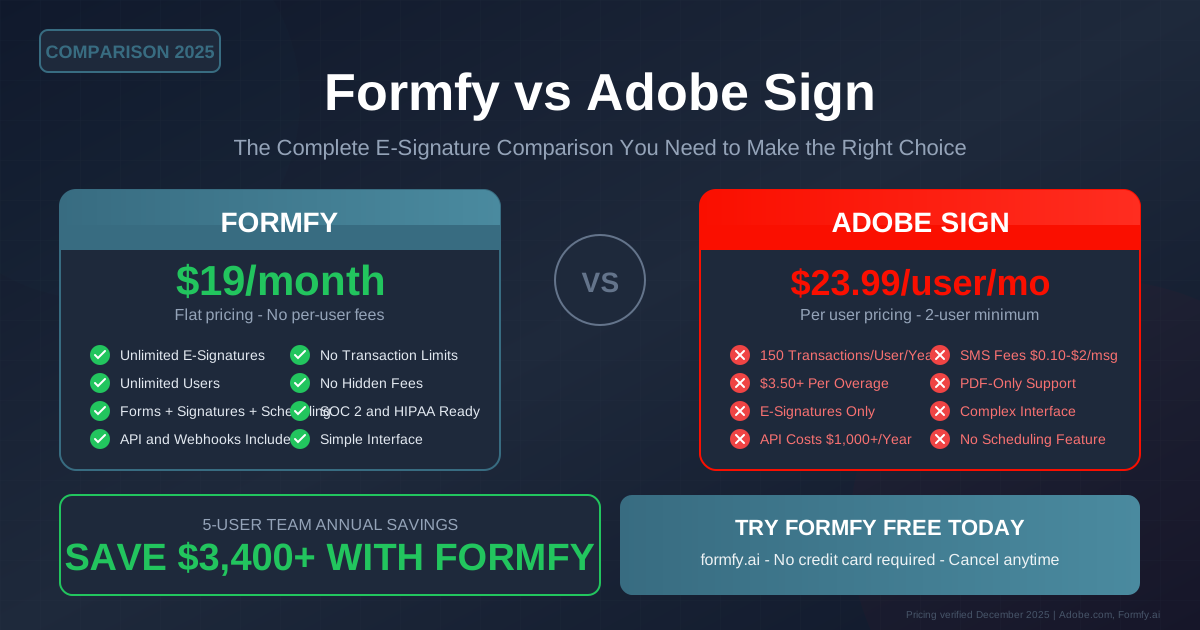
Formfy offers unlimited e-signatures, forms, scheduling, and payments for a flat $19/month—regardless of how many users or documents you process.
Adobe Sign starts at $23.99/user/month with a 2-user minimum ($47.98/month minimum) and caps you at 150 transactions per user per year. Overage fees, API costs, and SMS charges add up quickly.
For a 5-person team processing 100 documents monthly, the annual cost difference can exceed $3,400.
| Feature | Formfy | Adobe Sign |
|---|---|---|
| Starting Price | $19/month flat | $23.99/user/month (min 2 users) |
| E-Signature Limit | Unlimited | 150/user/year (then $3.50+ each) |
| Users Included | Unlimited | Per-user pricing |
| Forms Builder | ||
| Scheduling | ||
| Payment Collection | ||
| API Access | Included | $1,000+/year extra |
| SMS Notifications | Included | $0.10-$2 per message |
Understanding the Adobe Sign Pricing Problem
Adobe Sign's pricing model looks simple at first—$23.99 per user per month for the Acrobat Pro plan that includes e-signatures. But the reality for growing businesses is far more complex and expensive.
The Transaction Cap Problem
Adobe Sign's most significant limitation is the 150-transaction-per-user annual cap. Let's break down what this means in practice:
- 150 transactions/year = roughly 12-13 documents per month per user
- A single user sending 15 contracts per month will hit their limit by October
- Overage fees range from $3.50 to $5+ per document depending on your plan
- There's no rollover—unused transactions expire at year-end
For context, a small real estate agency with 3 agents might process 50+ transactions monthly during busy seasons. That's 600+ transactions annually when their Adobe Sign allocation only provides 450.
Per-User Pricing Multiplies Costs
Adobe Sign's per-user model means every team member who needs to send documents requires their own paid seat:
| Team Size | Adobe Sign Monthly | Adobe Sign Annual | Formfy Annual |
|---|---|---|---|
| 2 users | $47.98 | $575.76 | $228 |
| 5 users | $119.95 | $1,439.40 | $228 |
| 10 users | $239.90 | $2,878.80 | $228 |
| 25 users | $599.75 | $7,197.00 | $228 |
With Formfy's flat $19/month pricing, you pay the same whether you have 2 users or 200.
Hidden Fees That Add Up
Beyond the base subscription, Adobe Sign charges extra for features that Formfy includes:
- API Access: $1,000+/year for developers to integrate with your systems
- SMS Notifications: $0.10-$2.00 per text message sent to signers
- Knowledge-Based Authentication (KBA): Additional per-transaction fees
- Phone Support: Premium support requires enterprise plans starting at $79.99/user/month
- Advanced Workflows: Complex routing and approval chains require higher tiers
Feature-by-Feature Comparison
E-Signature Capabilities
Both platforms offer legally binding e-signatures compliant with the ESIGN Act and UETA. However, there are notable differences in how they deliver this core functionality.
Adobe Sign Strengths:
- Deep integration with Adobe Acrobat ecosystem
- Advanced form field recognition for PDFs
- Robust audit trails and certificate of completion
- Support for digital signatures (PKI-based)
- European Union eIDAS compliance built-in
Formfy Advantages:
- Unlimited signatures without transaction caps
- Simpler, more intuitive signing experience
- Mobile-optimized signing flow
- Faster document turnaround times
- No per-signature fees regardless of volume
The Verdict: Adobe Sign offers more advanced enterprise features like PKI digital signatures, but Formfy delivers unlimited core e-signature functionality without volume restrictions. For most SMBs, Formfy's approach means predictable costs and no surprise bills.
Forms and Document Collection
This is where Formfy significantly outpaces Adobe Sign.
Formfy Forms:
- Drag-and-drop form builder
- 15+ field types
- File uploads and multi-page forms
- Pre-fill from CRM or URL parameters
- Branded form experiences
- Encryption, audit trail, and access controls (Formfy does not claim HIPAA certification)
- Automatic PDF generation from submissions
Adobe Sign Forms:
- Limited to PDF-based templates
- Requires uploading pre-designed documents
- No native form builder
- Must integrate with Adobe Experience Manager ($$$) for advanced forms
- Web forms are basic fill-and-sign only
The Verdict: Formfy includes a full-featured form builder. Adobe Sign expects you to bring pre-made PDFs or pay for additional Adobe products.
Scheduling and Appointments
Formfy:
- Built-in scheduling pages
- Calendar sync (Google, Outlook, iCal)
- Automatic timezone detection
- Buffer times between appointments
- Team scheduling with round-robin assignment
- Custom booking rules and availability
- Email and SMS reminders included
Adobe Sign:
- No scheduling features
- Must integrate third-party tools (Calendly, Acuity, etc.)
- Additional subscription costs for scheduling
- No native calendar management
The Verdict: Formfy eliminates the need for separate scheduling software. Adobe Sign requires you to manage another vendor relationship and subscription.
Payment Collection
Formfy:
- Stripe integration for payment collection
- Accept payments within forms
- Deposit collection during booking
- Invoice generation
- Payment confirmation with signatures
- No transaction fees from Formfy (only standard Stripe fees)
Adobe Sign:
- No native payment collection
- Requires integration with external payment processors
- No unified form + payment experience
- Must manage separate invoicing systems
The Verdict: Formfy lets you collect signatures and payments in a single workflow. Adobe Sign treats payments as an external concern.
API and Integrations
Formfy:
- RESTful API included in all plans
- Webhooks for real-time notifications
- Zapier integration (5,000+ apps)
- Native integrations with popular CRMs
- No additional API fees
Adobe Sign:
- API access requires enterprise plans or additional purchase
- Robust API with extensive documentation
- Pre-built integrations with Microsoft, Salesforce, Workday
- API calls may be metered on some plans
- Starting cost: $1,000+/year for API access
The Verdict: For businesses needing API access, Formfy includes it free. Adobe Sign's API is powerful but comes at a premium price.
Security and Compliance
Both platforms take security seriously:
Formfy:
- 256-bit AES encryption
- Audit trail and access controls
- ESIGN Act and UETA compliant
- GDPR compliant
- Regular security reviews
- Formfy does not claim HIPAA or SOC 2 certification; teams with covered-entity or regulated workflows should verify their compliance obligations
Adobe Sign:
- SOC 2 Type II certified
- HIPAA-compliant (enterprise plans)
- ISO 27001 certified
- FedRAMP authorized
- eIDAS compliant (EU)
- Advanced authentication options
The Verdict: Both platforms meet enterprise security requirements. Adobe Sign offers additional compliance certifications relevant to government and European businesses. Formfy covers the essential certifications most businesses need.
Real-World Pricing Scenarios
Let's examine what each platform actually costs for different business types:
Scenario 1: Solo Consultant
A freelance consultant needs to send 20 contracts per month.
Adobe Sign:
- Minimum 2-user requirement: $47.98/month ($575.76/year)
- 240 annual transactions (only needs 240, barely covered)
- No forms, scheduling, or payments included
- Separate tools needed: +$30-50/month for scheduling + forms
Formfy:
- $19/month ($228/year)
- Unlimited contracts
- Forms, scheduling, and payments included
- Everything in one platform
Annual Savings with Formfy: $700+
Scenario 2: Small Real Estate Team
A 5-agent real estate team processing 75 transactions monthly.
Adobe Sign:
- 5 users × $23.99 = $119.95/month ($1,439.40/year)
- 750 transactions included (150 × 5)
- 900 transactions needed annually (75 × 12)
- Overage: 150 × $3.50 = $525/year
- Total: $1,964.40/year
Formfy:
- $19/month flat ($228/year)
- Unlimited transactions
- Unlimited users (all 5 agents + admin staff)
- Total: $228/year
Annual Savings with Formfy: $1,736+
Scenario 3: Growing Agency
A digital marketing agency with 15 employees processing 200 documents monthly.
Adobe Sign:
- 15 users × $23.99 = $359.85/month ($4,318.20/year)
- 2,250 transactions included
- 2,400 transactions needed
- Overage: 150 × $3.50 = $525
- API access for website integration: $1,000/year
- SMS notifications: ~$500/year
- Total: $6,343.20/year
Formfy:
- $19/month ($228/year)
- All features included
- Total: $228/year
Annual Savings with Formfy: $6,115+
Who Should Choose Adobe Sign?
Despite the cost differences, Adobe Sign makes sense for certain organizations:
Enterprise Requirements
- Large organizations already invested in the Adobe ecosystem (Creative Cloud, Experience Cloud)
- Companies requiring FedRAMP authorization for government contracts
- European businesses needing full eIDAS qualified signatures
- Organizations with complex approval workflows requiring advanced routing
PDF-Centric Workflows
- Law firms working primarily with existing PDF contracts
- Companies with extensive PDF template libraries
- Teams using Adobe Acrobat for document creation and editing
Advanced Authentication Needs
- Financial services requiring knowledge-based authentication
- Healthcare organizations needing identity verification
- Any business requiring PKI-based digital signatures
Existing Adobe Customers
- Teams already paying for Acrobat Pro ($22.99/month)
- The incremental cost to add Sign is just $1/month/user
- Deep integration with Acrobat tools you already use
Who Should Choose Formfy?
Formfy is the better choice for most small and medium businesses:
Budget-Conscious Teams
- Startups watching every dollar
- Small businesses without enterprise budgets
- Growing companies that don't want costs scaling with headcount
All-in-One Needs
- Businesses needing forms + signatures + scheduling + payments
- Teams tired of managing multiple subscriptions
- Companies wanting unified customer data
High-Volume Senders
- Real estate agencies processing many transactions
- HR departments onboarding multiple employees monthly
- Sales teams sending numerous proposals
- Any business exceeding 12-13 documents per user monthly
Growth-Stage Companies
- Businesses planning to add team members
- Companies expecting document volume to increase
- Organizations wanting predictable, fixed costs
Simplicity Seekers
- Teams wanting quick implementation
- Non-technical users who need intuitive tools
- Businesses without dedicated IT support
Making the Switch from Adobe Sign
If you're currently on Adobe Sign and considering Formfy, here's what the transition looks like:
Data Migration
- Export your templates from Adobe Sign
- Recreate signature templates in Formfy (typically takes 10-15 minutes per template)
- Historical signed documents remain accessible in Adobe Sign
Timeline
- Most businesses complete migration in 1-2 days
- No downtime—run both platforms in parallel during transition
- Formfy support available for migration assistance
What You'll Gain
- Immediate access to forms, scheduling, and payments
- Unlimited users from day one
- No more transaction counting or overage tracking
- Single dashboard for all customer interactions
What to Consider
- If you rely heavily on Acrobat integration, evaluate your workflow
- Check if any integrations specifically require Adobe Sign
- Review any contracts with minimum commitment periods
The Bottom Line: Value vs. Features
The choice between Formfy and Adobe Sign ultimately comes down to your priorities:
Choose Adobe Sign if:
- You need advanced enterprise features (FedRAMP, eIDAS qualified signatures, PKI)
- You're already deeply integrated into Adobe's ecosystem
- Budget is not a primary concern
- You require specific Adobe-only integrations
Choose Formfy if:
- You want predictable, flat-rate pricing
- You need forms, scheduling, and payments alongside e-signatures
- You're a small-to-medium business watching costs
- You want simplicity without sacrificing functionality
- You plan to grow without costs multiplying
For most businesses processing regular document volumes, Formfy delivers everything needed at a fraction of Adobe Sign's cost. The savings compound significantly as your team grows—turning what would be a $6,000+ annual expense into a flat $228.
Frequently Asked Questions
Is Formfy legally binding like Adobe Sign?
Yes. Both Formfy and Adobe Sign provide legally binding e-signatures compliant with the ESIGN Act, UETA, and international e-signature laws. Formfy includes comprehensive audit trails, signer authentication, and tamper-evident seals.
Can I use Formfy for HIPAA-regulated documents?
Formfy implements encryption, audit trail, and access controls. Formfy does not claim HIPAA certification; teams with covered-entity workflows should review their compliance obligations before handling protected health information.
What happens if I exceed Adobe Sign's transaction limit?
You'll be charged overage fees typically ranging from $3.50-$5.00 per additional transaction. These fees can add hundreds or thousands of dollars to your annual costs unexpectedly. With Formfy, there are no transaction limits or overage fees.
Does Formfy integrate with Salesforce, HubSpot, and other CRMs?
Yes. Formfy integrates with major CRMs through native connections and Zapier. The included API and webhooks enable custom integrations with virtually any platform.
Can I migrate my templates from Adobe Sign to Formfy?
Yes. While there's no direct import feature, recreating templates in Formfy is straightforward. Most templates can be rebuilt in 10-15 minutes, and Formfy's support team can assist with migration.
Is there a free trial for Formfy?
Yes. Formfy offers a free trial so you can test all features before committing. No credit card is required to start.
Which platform has better mobile support?
Both platforms work on mobile devices. Formfy's signing experience is specifically optimized for mobile, with touch-friendly interfaces and responsive design. Adobe Sign's mobile app is functional but can feel cluttered for simpler use cases.
What kind of support does Formfy offer?
Formfy provides email support on all plans, with priority support for business accounts. Documentation, tutorials, and a knowledge base are freely available. Adobe Sign's phone support requires enterprise plans starting at $79.99/user/month.
Conclusion: Making Your Decision
Adobe Sign is a capable enterprise e-signature platform backed by Adobe's extensive resources. However, for the vast majority of small and medium businesses, it represents significant overpayment for features they'll never use, combined with restrictive transaction caps that punish growth.
Formfy offers a modern alternative: unlimited everything for one flat price. E-signatures, forms, scheduling, payments, and API access—all included without transaction limits, per-user fees, or surprise overage charges.
The question isn't whether Adobe Sign is a good product—it is. The question is whether it's the right product for your business at its price point.
For most businesses, the answer is clear: Formfy delivers the core functionality you need at a price that makes sense, with room to grow without financial penalties.
Ready to see the difference? Start your free Formfy trial today—no credit card required. Experience unlimited e-signatures, forms, scheduling, and payments in one simple platform.
Related Articles
Formfy Team
Product Team
The Formfy team is dedicated to simplifying e-signatures, forms, and scheduling for businesses of all sizes.
Related Articles

Why DocuSign Isn't Built for Waivers: A Better Alternative for Consent and Liability Forms
Learn how to improve docusign alternative for waivers with forms, signatures, and faster workflows. Compare options and start with Formfy.
Best Waiver App for Events and Festivals in 2026: What Event Organizers Actually Need
Learn how to improve best waiver app for events with forms, signatures, and faster workflows. Compare options and start with Formfy.
5 Platforms with Built-In Waivers and Payments for Fitness Events and Bootcamps
Compare 5 platforms that combine liability waivers, payment collection, and registration for fitness events, bootcamps, and pop-up classes in one flow.