
Digital Forms & E-Signatures for Real Estate Agents 2025
How real estate agents use digital forms and e-signatures to close deals faster. Complete guide for agents, brokers, and transaction coordinators.
Formfy Team
Product Team
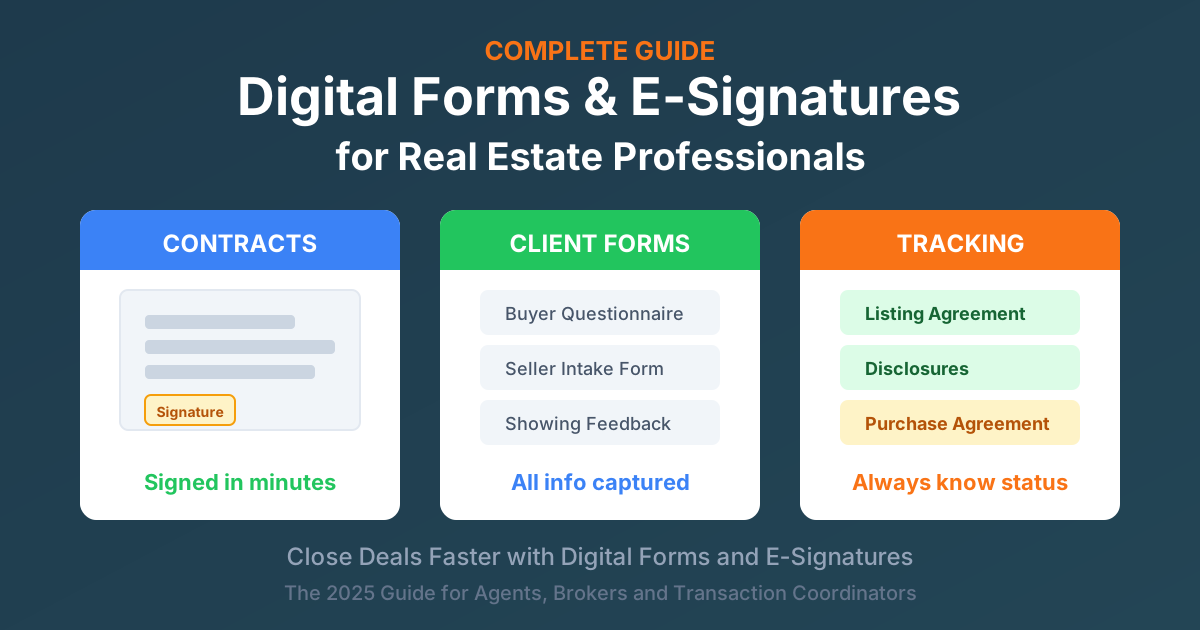
In real estate, timing is everything. While you're waiting for a client to print, sign, scan, and email back a purchase agreement, another agent could be closing the deal.
The real estate paperwork reality is challenging:
- Average transaction involves 100+ pages of documents
- Multiple parties need to sign (buyers, sellers, agents, lenders)
- Time-sensitive deadlines (contingency periods, closing dates)
- One missing signature can delay closing by days
- Paper documents get lost, damaged, or stuck in mail
Digital transformation changes everything for agents:
- Contracts signed in minutes, not days
- Documents accessible anywhere (showings, open houses, client meetings)
- Automatic tracking of what's signed and what's pending
- Legally binding with better audit trails than paper
- Happier clients who don't have to deal with paper
Who this guide is for:
- Real estate agents and Realtors
- Broker-owners and managing brokers
- Transaction coordinators
- Property managers
- Real estate teams
- Commercial real estate professionals
Why Real Estate Needs Digital Forms and E-Signatures
The Speed Advantage
| Process | Paper | Digital |
|---|---|---|
| Getting signatures | 3-7 days | Same day |
| Scheduling meetings | Required | Optional |
| Weekend/evening access | Limited | Always available |
| Multiple party signing | Days of coordination | Hours |
Remote signing means no scheduling in-person meetings. Clients can sign at night, on weekends, or during lunch breaks — when they actually have time to focus on important documents.
The Accuracy Advantage
Digital forms eliminate common paper problems:
- Required fields ensure nothing is missed
- Auto-populated data reduces transcription errors
- Date/time stamps are automatic and accurate
- No illegible handwriting issues
- Version control prevents confusion about which document is current
The Compliance Advantage
Digital signatures provide better documentation:
- Complete audit trail for every document
- Timestamps prove exactly when documents were signed
- IP addresses and authentication logged for verification
- Meets state real estate commission requirements
- ESIGN Act and UETA compliant nationwide
The Client Experience Advantage
Modern clients expect modern processes:
- Sign from phone while at work or home
- No printer, scanner, or fax machine needed
- Review documents at their own pace
- Professional, modern experience
- Shows you're a tech-savvy, efficient agent
Essential Documents Every Real Estate Agent Needs Digitally
Real estate transactions involve dozens of documents. Here's how they organize into the transaction lifecycle:
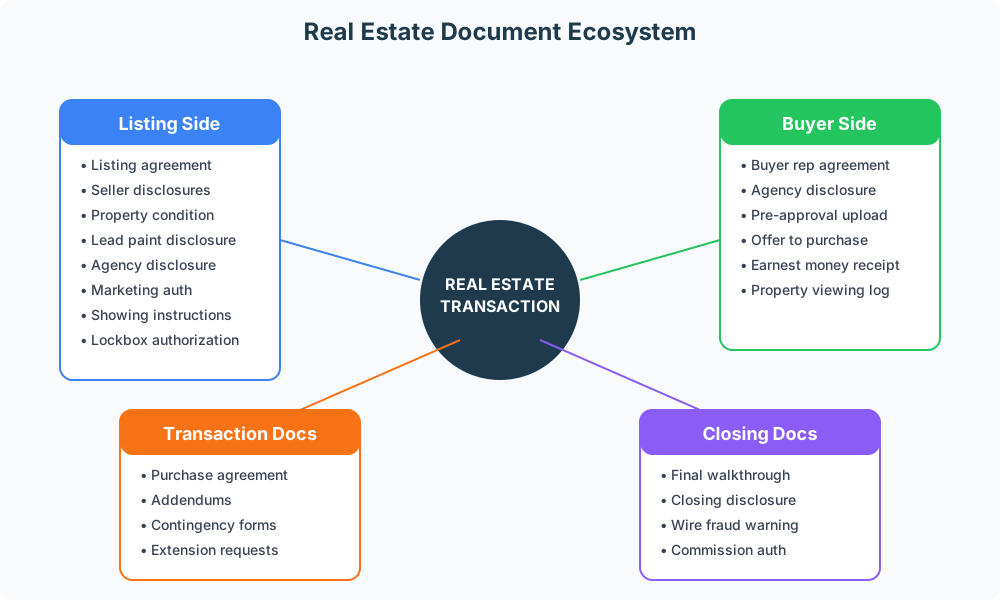
Listing Side Documents
When representing sellers, you'll need:
- Listing agreement — The contract between you and the seller
- Seller disclosures — Required property condition information
- Property condition report — Detailed condition documentation
- Lead-based paint disclosure — Required for pre-1978 homes
- Agency disclosure — Explaining your role and duties
- Marketing authorization — Permission for photos, videos, marketing
- Showing instructions — Access and scheduling preferences
- Lockbox authorization — Permission to install lockbox
Buyer Side Documents
When representing buyers:
- Buyer representation agreement — Your contract with the buyer
- Buyer agency disclosure — Explaining your fiduciary duties
- Pre-approval letter upload — From their lender
- Offer to purchase — The initial offer document
- Earnest money receipt — Documenting the deposit
- Property viewing log — Tracking homes shown
Transaction Documents
Once under contract:
- Purchase agreement/contract — The main contract
- Addendums and amendments — Changes to terms
- Inspection contingency forms — Response to inspection findings
- Appraisal contingency forms — Handling appraisal issues
- Financing contingency forms — Loan-related contingencies
- Extension requests — When more time is needed
- Closing instructions — For title and escrow
Closing Documents
At the finish line:
- Final walkthrough checklist — Documenting property condition
- Closing disclosure review — Acknowledging receipt
- Wire fraud warning acknowledgment — Critical security document
- Key receipt — Documenting key handover
- Commission disbursement authorization — For payment processing
The Digital Transaction Timeline
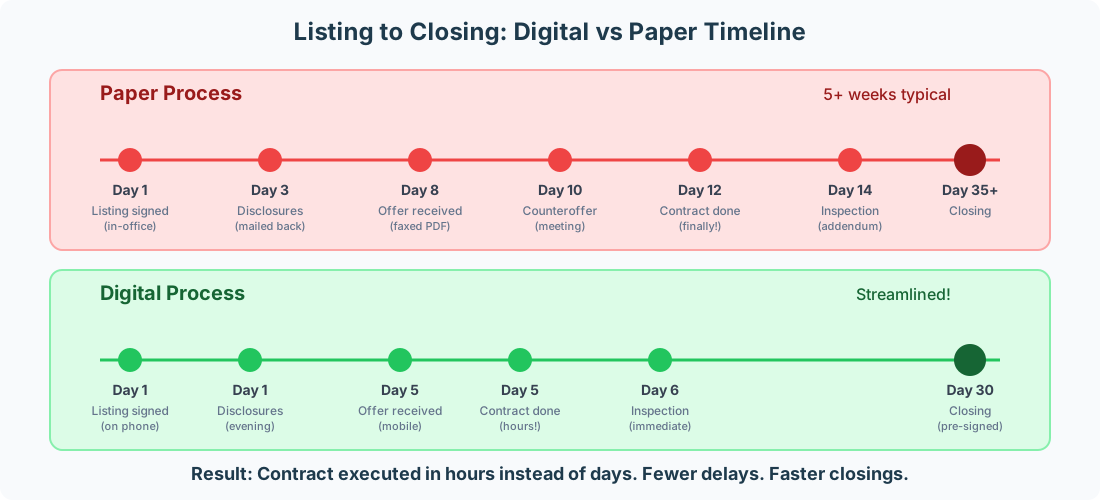
The difference between paper and digital processes is dramatic:
Paper Process: Multiple Friction Points
With traditional paper processes:
- Listing signed in office (requires scheduling)
- Disclosures mailed and returned (3+ days)
- Offers received via fax or scanned PDF
- Counteroffers require another meeting
- Contract takes 10+ days to fully execute
- Every addendum adds more delay
Digital Process: Streamlined Flow
With digital forms and e-signatures:
- Listing signed on phone the same day
- Disclosures completed same evening
- Offers received and signed on mobile devices
- Counteroffers executed same day
- Contract fully executed in hours
- Addendums signed immediately
The result: Contract execution in hours instead of days. Fewer delays. Faster closings. Happier clients.
State-Specific Compliance Considerations
Digital signatures are legal for real estate nationwide, but states have nuances to understand.
Universal Legal Framework
ESIGN Act (Federal):
- Electronic signatures legally equivalent to handwritten
- Applies to interstate commerce (most real estate qualifies)
- Requires consent to electronic process
- Mandates record retention
UETA (State Level):
- Adopted by 47 states
- Mirrors ESIGN at state level
- Provides additional enforceability
What's Required for Compliance
For your e-signatures to be legally valid:
- Signer intent — Clear indication they mean to sign
- Consent to electronic process — Documented agreement
- Signature association — Connected to the specific document
- Record retention — Properly maintained with audit trail
Best Practices for Real Estate Compliance
- Use forms approved by your state/local association — They're designed for compliance
- Check with your broker — Ensure platform is approved
- Maintain records per state requirements — Typically 3-7 years
- Document client consent — Before first electronic signature
- Stay updated on regulatory changes — Requirements evolve
Simplifying Your Tech Stack
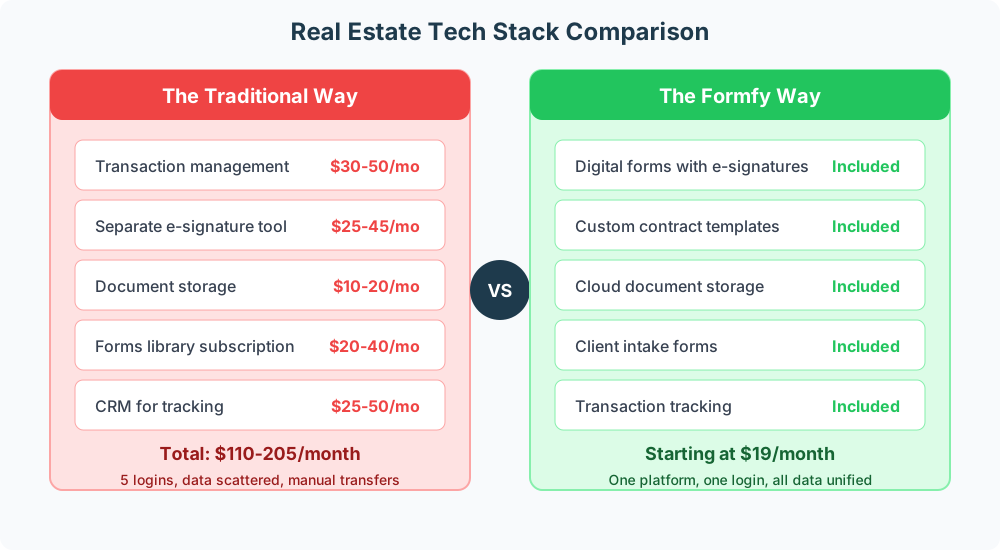
Many agents cobble together multiple tools, creating complexity and cost:
The Problem with Multiple Tools
When you use separate systems for transaction management, e-signatures, document storage, forms, and CRM:
- Multiple subscriptions add up ($110-205/month is common)
- Multiple logins waste time every day
- Data silos mean information doesn't flow between systems
- Manual transfers create opportunities for errors
- Learning curve multiplied across platforms
The All-in-One Advantage
With an integrated platform:
- Single subscription — One predictable cost
- One login — Access everything instantly
- Unified data — Complete transaction picture
- Automatic flow — Information moves seamlessly
- Simpler training — Learn one system
Key Features for Real Estate Professionals
When evaluating digital form and e-signature solutions, prioritize these capabilities:
Document Management
- Organize by transaction/property — Find anything instantly
- Tag and categorize — Custom organization that fits your workflow
- Search across all transactions — Full-text search of all documents
- Share with stakeholders — Clients, other agents, title companies, lenders
- Access from anywhere — At showings, open houses, client meetings
E-Signature Capabilities
- Multiple signers — Sequential or parallel signing workflows
- Signer authentication — Email, SMS, or knowledge-based options
- Automatic reminders — Follow up with unsigned parties automatically
- Real-time status tracking — Know exactly where every document stands
- Complete audit trail — Full legal documentation
Form Building
- Create custom forms — For your specific needs
- Buyer/seller questionnaires — Gather information before meetings
- Property showing feedback — Collect buyer reactions
- Client satisfaction surveys — Improve your service
- Lead capture forms — For your website
Client Experience
- Mobile-friendly — Works perfectly on phones and tablets
- No account required — Clients sign without creating accounts
- Clear presentation — Professional, branded experience
- Automatic confirmations — Clients get copies immediately
- Easy document access — Retrieve signed documents anytime
Use Cases by Transaction Type
Different transaction types have different document needs:
Residential Sales
The most common transaction type:
- Listing presentations — Send digital agreements before or after meeting
- Offer packages — Sent and signed same-day
- Multiple offer management — Handle competing offers efficiently
- Quick counteroffers — Negotiate in real-time
- Streamlined closing prep — Most documents pre-signed digitally
Residential Rentals
For property managers and agents handling rentals:
- Lease agreements — Digital signing for all parties
- Rental applications — With background check consent
- Move-in/move-out inspections — Photo documentation included
- Pet addendums — Additional terms for pet owners
- Security deposit receipts — Clear documentation
Commercial Real Estate
Commercial transactions have their own requirements:
- Letters of intent (LOI) — Initial interest documentation
- Commercial lease agreements — Often longer and more complex
- Tenant improvement agreements — Build-out terms
- Estoppel certificates — For property sales with existing tenants
- Assignment and assumption agreements — Lease transfers
Property Management
Ongoing management needs:
- Maintenance request forms — Tenant submissions
- Lease renewals — Annual renewal process
- Notice forms — Rent increases, violations, move-out
- Vendor agreements — Contractor and service provider contracts
- Property inspection checklists — Regular documentation
The Client Journey with Digital Forms
From first contact to closing, digital forms create a seamless experience:
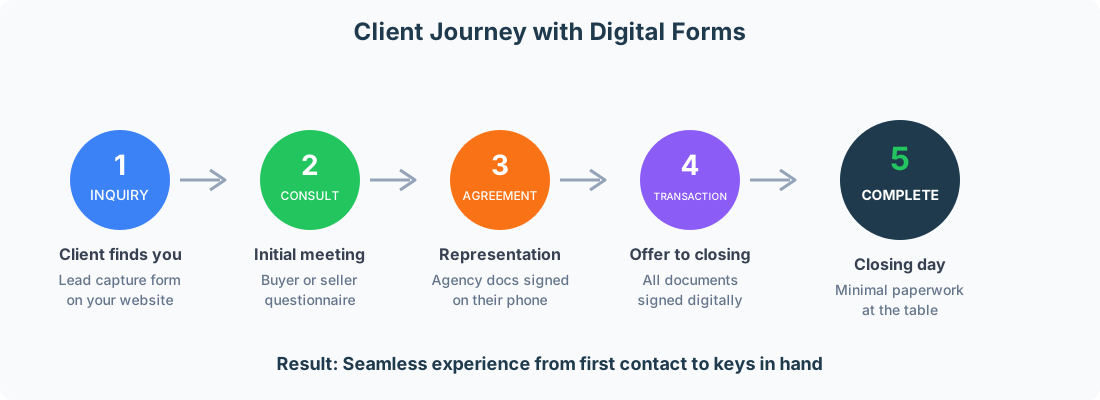
Stage 1: Inquiry
Client finds you online or through referral:
- Lead capture form on your website
- Contact information collected automatically
- Immediate follow-up triggered
- No manual data entry
Stage 2: Consultation
Initial meeting to understand needs:
- Pre-meeting questionnaire sent digitally
- Buyer or seller priorities documented
- Timeline and budget captured
- Better prepared for the conversation
Stage 3: Agreement
Formalizing the relationship:
- Agency disclosures explained and signed
- Representation agreement executed
- All done on their phone in minutes
- Professional, modern impression
Stage 4: Transaction
From offer to closing:
- All documents signed digitally
- Status tracking for all parties
- Quick turnaround on addendums
- No document hunting
Stage 5: Complete
Closing day and beyond:
- Minimal paperwork at the table
- Everything pre-signed and organized
- Clear documentation for records
- Easy handoff of keys
Best Practices for Digital Real Estate Transactions
Before the Transaction
Set up for success:
- Create templates for common documents
- Build intake forms for new clients
- Establish naming conventions for files
- Test the signing experience yourself
- Train any team members
During the Transaction
Execute efficiently:
- Send documents promptly after verbal agreements
- Use clear subject lines and instructions
- Set reasonable deadlines with automatic reminders
- Track signing status proactively
- Follow up personally on pending signatures
After the Transaction
Close the loop:
- Organize and archive completed files
- Ensure all parties have final copies
- Maintain records per state requirements
- Request testimonials/reviews (separate form)
- Update your CRM with transaction data
Security and Compliance for Real Estate
Real estate transactions involve sensitive information that must be protected.
Information You're Handling
- Personal information — Names, addresses, SSNs on some documents
- Financial information — Income, assets, loan details
- Property information — Addresses, values, conditions
- Transaction details — Prices, terms, contingencies
Security Requirements
Your digital platform should provide:
- Encryption in transit — SSL/TLS for all data transfer
- Encryption at rest — Data encrypted in storage
- Secure authentication — Strong login security
- Access controls — Limit who sees what
- Audit logging — Track all access and changes
- Regular backups — Protection against data loss
Wire Fraud Prevention
Real estate is a major target for wire fraud. Digital forms help by:
- Documenting warnings — Wire fraud acknowledgment forms
- Secure communication — Encrypted document delivery
- Verification trails — Proof of who sent what when
- No email attachments — Secure links instead of vulnerable PDFs
Getting Started: Implementation for Agents
Follow this four-week plan to go digital:
Week 1: Setup
- Choose your digital forms platform
- Set up account with your branding (logo, colors)
- Upload or create essential templates
- Test the signing experience end-to-end
- Connect lead forms to your website
Week 2: Template Creation
- Listing agreement template
- Buyer representation agreement
- Seller intake questionnaire
- Buyer intake questionnaire
- Common addendums and disclosures
Week 3: Workflow Integration
- Update email templates with form links
- Add QR codes to marketing materials
- Brief any team members on new process
- Set up notifications and reminders
- Establish file organization system
Week 4: Go Live
- Use digital process for new transactions
- Track time savings and client feedback
- Refine templates based on experience
- Gather testimonials from happy clients
- Expand usage to more document types
ROI of Digital Forms for Real Estate
The investment in digital tools pays for itself quickly.
Time Savings
| Activity | Paper | Digital | Savings |
|---|---|---|---|
| Contract execution | 3-7 days | Same day | 2-6 days |
| Document retrieval | 10-30 min | 30 seconds | 10-30 min |
| Follow-up on signatures | Hours | Automated | Hours |
| Filing and organization | Hours/week | Minutes | Hours |
Per transaction: 5-10 hours saved Per year (24 transactions): 120-240 hours saved
Cost Savings
- Printing eliminated — No paper, ink, or printer maintenance
- Courier/mailing eliminated — No FedEx or USPS costs
- Storage reduced — No filing cabinets or storage fees
- Errors reduced — Fewer costly mistakes and delays
Revenue Impact
- Faster closings — Complete more transactions per year
- Better client experience — More referrals and repeat business
- Professional image — Win more listings with modern approach
- Extended availability — Accommodate more clients with 24/7 signing
Calculate Your ROI
Example calculation:
- Close 24 transactions per year
- Save 5 hours per transaction = 120 hours saved
- Effective hourly rate: $50
- Value of time saved: $6,000
Platform cost: $228/year ($19/month)
Net benefit: $5,772 in time value alone, plus faster closings, happier clients, and more referrals.
Why Real Estate Professionals Choose Formfy
Formfy is built for real estate workflows:
E-Signatures on Unlimited Documents Sign listing agreements, purchase contracts, addendums, and any other document. No per-signature fees means predictable costs regardless of transaction volume.
Custom Forms for Any Need Create buyer questionnaires, seller intake forms, showing feedback surveys, and more. Drag-and-drop builder makes it easy.
Mobile-Friendly for On-the-Go Agents Access everything from your phone at showings, open houses, and client meetings. Clients sign on their phones too.
Document Organization Keep all transaction documents organized and searchable. Find anything in seconds.
Professional Branded Experience Your logo, your colors, your professional image in every document.
Affordable for Individual Agents Starting at $19/month with unlimited signatures. No per-transaction fees. Full feature access.
vs. Traditional Real Estate Software
| Feature | Traditional Stack | Formfy |
|---|---|---|
| Transaction management | $30-50/mo | Included |
| E-signatures | $25-45/mo | Included |
| Document storage | $10-20/mo | Included |
| Forms | $15-30/mo | Included |
| Total | $80-145/mo | $19/mo |
Common Questions About Real Estate E-Signatures
Summary
Digital forms and e-signatures are essential for modern real estate:
- Speed matters — Contracts executed in hours, not days
- Client experience — Sign anywhere, anytime, on any device
- Compliance — Complete audit trails meet all legal requirements
- Cost savings — Eliminate printing, mailing, and storage costs
- Time savings — 5-10 hours saved per transaction
- Professional image — Modern tools win more business
For real estate professionals, the question isn't whether to go digital — it's how quickly you can make the switch and start reaping the benefits.
Ready to Modernize Your Real Estate Business?
Join thousands of real estate professionals who have streamlined their transactions with digital forms and e-signatures.
Related Articles
Formfy Team
Product Team
Related Articles

How to Choose Digital Waiver Software for Your Fitness Studio: A Feature Buying Guide
Evaluate digital waiver software for your gym or studio. Feature checklist covering risk language, screening, guardian flows, upload conversion, and signatures.
Acupuncture and Holistic Health Intake Forms: Build Complete Consent and Screening Workflows for Wellness Practices
Build complete acupuncture intake forms with TCM diagnostic screening, medication checks, contraindication logic, multi-modality consent, and e-signatures.
How to Digitize Daycare Registration Forms (Enrollment, Consent & Pickup Auth)
Step-by-step guide to digitizing daycare enrollment forms. Covers registration, guardian consent, medical history, allergy disclosures, and pickup authorization — all in one digital packet.