
Best Waiver Software in 2025: How to Choose the Right One
Not all waiver software is the same. Compare features, pricing, and workflows to find the best fit for gyms, studios, vacation rentals, and service businesses.
Formfy Team
Product Team
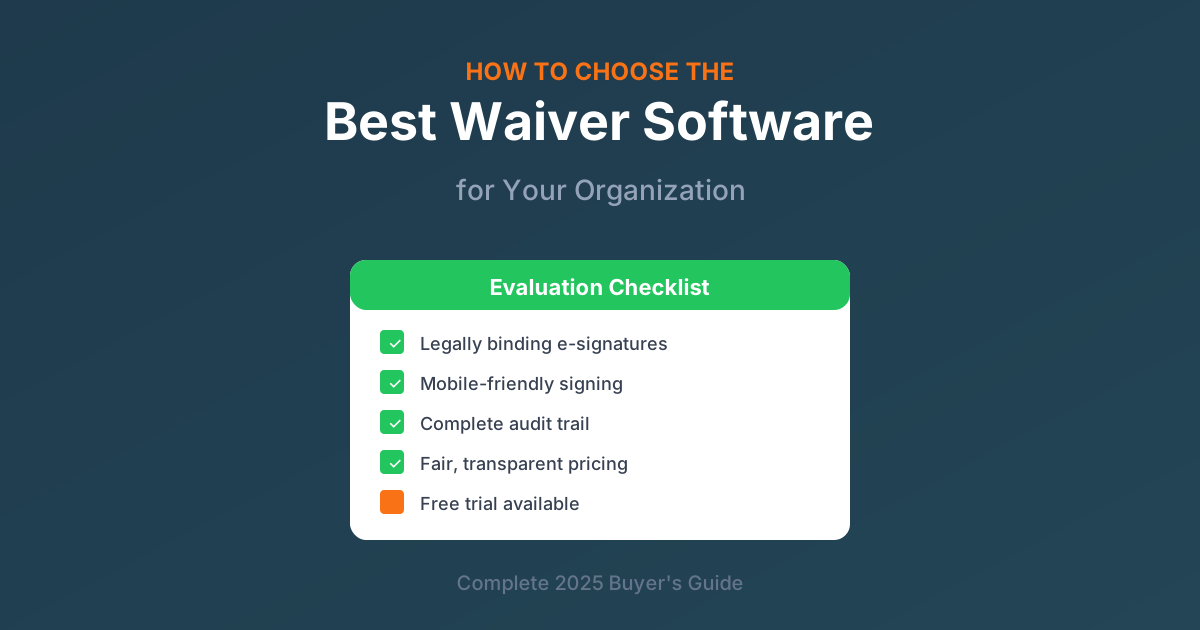
Whether you run a fitness studio, adventure company, event venue, or healthcare practice, collecting signed waivers is essential for protecting your business. But with dozens of waiver software options available, how do you choose the right one?
This comprehensive guide walks you through everything you need to know:
- What waiver software actually does
- Key features to look for
- Questions to ask before buying
- Pricing models explained
- Red flags to avoid
- How to evaluate your options step-by-step
By the end, you'll know exactly what to look for and how to make the right choice for your organization.
What Is a Waiver?
Before diving into software, let's establish what we're talking about. A waiver is a legal document where a participant acknowledges the risks of an activity and agrees not to hold your organization liable for injuries or damages.
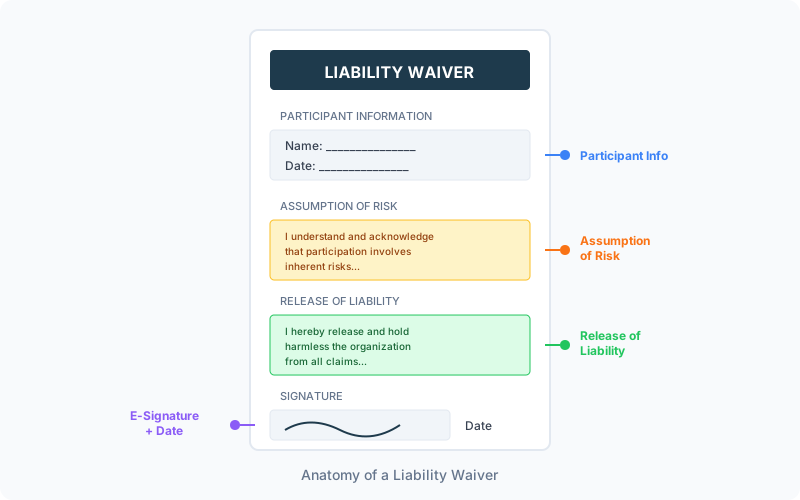
You might also hear waivers called:
- Liability waivers
- Release forms
- Assumption of risk agreements
- Hold harmless agreements
- Participant agreements
Industries that commonly use waivers:
- Fitness studios and gyms
- Adventure and outdoor recreation
- Sports leagues and camps
- Event venues
- Healthcare practices
- Rental businesses
- Tour operators
- Trampoline parks and entertainment centers
Types of Waivers
Not all waivers are the same. Depending on your business, you might need:
| Waiver Type | Purpose | Common Industries |
|---|---|---|
| Liability/Release | Releases organization from injury claims | Fitness, adventure, sports |
| Photo/Media Release | Permission to use photos/videos | Events, camps, fitness |
| Consent Forms | Medical or activity consent | Healthcare, spas, tattoo |
| Participant Agreement | Terms of participation | Memberships, programs |
| Minor Waiver | Parent/guardian signs for child | Youth sports, camps, classes |
Why Digital Waivers Beat Paper
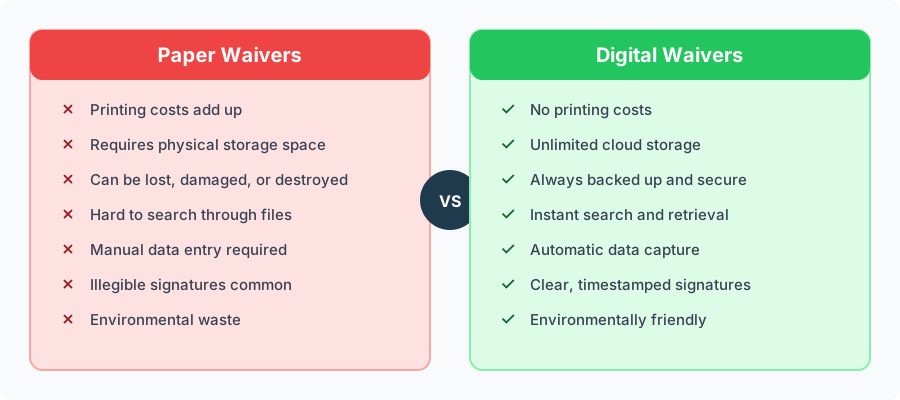
If you're still using paper waivers, you're creating unnecessary work and risk for your business. Here's why digital is better in every way:
The True Cost of Paper Waivers
Let's do the math. If you collect 500 waivers per year:
Paper costs:
- Printing: 500 pages × $0.10 = $50
- Filing supplies: ~$30
- Storage space: ~$100/year (if renting)
- Staff time for filing: 2 hours/month × $20/hour × 12 = $480
- Total: $660+ per year
Digital waiver software:
- Monthly subscription: ~$20-50/month
- Total: $240-600 per year
The cost is comparable or lower, and you get massive time savings and better legal protection.
Legal Protection Benefits
Digital waivers actually provide better legal protection than paper:
- Complete audit trail — Every waiver captures IP address, timestamp, device info, and browser
- No disputed signatures — Clear electronic signatures with verification
- Instant retrieval — Find any waiver in seconds when you need it
- No lost documents — Cloud backup ensures nothing disappears
- Consistent format — Every waiver is complete and legible
3 Key Benefits of Digital Waiver Software
When you switch to digital waiver software, you gain three major advantages:

1. Signatures Are Legally Binding
Electronic signatures have been legally equivalent to handwritten signatures since the ESIGN Act of 2000. Good waiver software ensures:
- ESIGN Act compliance — Federal law recognizing e-signatures
- UETA compliance — Uniform state-level e-signature laws
- Complete audit trails — Documentation that signatures are valid
- Proper consent — Clear indication that signer agrees to electronic process
2. Your Data Is Secure and Accessible
No more filing cabinets, lost documents, or illegible handwriting:
- Cloud storage — Access waivers from anywhere
- Automatic backups — Never lose a document
- Encrypted data — Protected from unauthorized access
- Instant search — Find any waiver in seconds
- Export options — Download your data anytime
3. Your Clients Enjoy a Better Experience
The signing experience matters for customer satisfaction:
- Sign from anywhere — Home, office, or on-site
- Mobile-friendly — Works on any smartphone
- No waiting in line — Sign before arriving
- Quick process — Usually under 2 minutes
- Confirmation emails — Automatic copies for their records
Essential Features to Look For
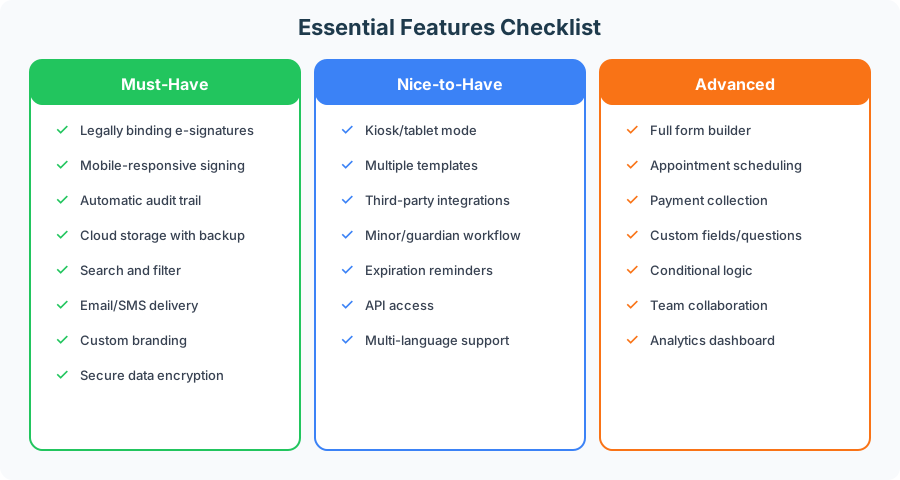
Not all waiver software is created equal. Here's what to look for:
Must-Have Features
These features are non-negotiable. If a platform doesn't have them, keep looking:
Legally Binding E-Signatures
The core purpose of waiver software. Ensure it creates signatures that will hold up legally, with proper audit trails and compliance documentation.
Mobile-Responsive Signing
Over 60% of waivers are signed on mobile devices. The signing experience must work flawlessly on phones and tablets.
Automatic Audit Trail
Every signature should capture:
- Date and timestamp
- IP address
- Device information
- Browser details
- Consent confirmation
Cloud Storage with Backup
Your waivers need to be stored securely with automatic backups. You can't afford to lose signed documents.
Search and Filter Capabilities
You should be able to find any waiver instantly by:
- Signer name
- Date range
- Email address
- Waiver type
Email and SMS Delivery
Multiple ways to send waivers to signers:
- Email links
- SMS/text messages
- QR codes for on-site
- Embeddable forms for websites
Custom Branding
Your waivers should look professional with your:
- Logo
- Brand colors
- Custom header/footer
Secure Data Encryption
Data should be encrypted both in transit (HTTPS) and at rest (encrypted storage).
Nice-to-Have Features
These features aren't essential but add significant value:
- Kiosk/tablet mode — For on-site signing at check-in
- Multiple waiver templates — Different waivers for different activities
- Third-party integrations — Connect with your other business tools
- Minor/guardian workflow — Specialized flow for signing for children
- Expiration reminders — Automatic notifications when waivers expire
- API access — For custom integrations
- Multi-language support — For diverse customer bases
Advanced Features
For businesses that need more than just waivers:
- Full form builder — Create intake forms, registrations, surveys
- Appointment scheduling — Book sessions alongside waiver signing
- Payment collection — Collect deposits or fees with waiver signing
- Custom fields/questions — Gather additional information
- Conditional logic — Show/hide fields based on answers
- Team collaboration — Multiple staff accounts
A Checklist for Evaluating Waiver Software
Before making a decision, run through this evaluation checklist:
Legal and Compliance
- Does it create ESIGN Act compliant signatures?
- Is there a complete audit trail for each signature?
- Can I export signed waivers with audit data?
- How long are records retained?
- Is there HIPAA compliance (if needed)?
User Experience
- Can signers complete on mobile devices?
- Is the signing process intuitive?
- Can signers receive confirmation copies?
- Is there a kiosk mode for on-site signing?
Administration
- Can I search and filter past waivers?
- Are there notification options for new signatures?
- Can I customize waiver content easily?
- Is there multi-user access for staff?
Technical
- Is data encrypted in transit and at rest?
- Where are servers located?
- What's the backup policy?
- Can I export all my data if I leave?
Business
- What's the pricing model?
- Is there a free trial?
- What support options exist?
- Are there hidden fees?
Understanding Pricing Models
Waiver software pricing varies significantly. Understanding the models helps you calculate true costs:
Per-Waiver/Per-Signature Pricing
You pay for each completed waiver.
How it works: $0.50-2.00 per signed waiver
Pros:
- Low upfront cost
- Good for very low volume
- Pay only for what you use
Cons:
- Costs increase with volume
- Unpredictable monthly bills
- Expensive at scale
Best for: Businesses with under 50 waivers per month
Tiered Volume Pricing
You pay based on volume brackets.
How it works:
- Tier 1: $20/month for up to 100 waivers
- Tier 2: $45/month for up to 500 waivers
- Tier 3: $85/month for up to 2,000 waivers
Pros:
- Predictable within tier
- Scales somewhat with growth
- Often includes more features at higher tiers
Cons:
- Sharp cost increases when exceeding tier
- May pay for unused capacity
- Complex pricing to understand
Best for: Businesses with predictable, moderate volume
Unlimited/Flat-Rate Pricing
Fixed monthly fee with unlimited waivers.
How it works: $19-99/month for unlimited signatures
Pros:
- Completely predictable costs
- Scales infinitely with no extra cost
- Simple to understand
- Best value for high volume
Cons:
- Higher base cost than per-waiver at low volumes
- May include features you don't need
Best for: Businesses with more than 50 waivers per month
Calculating Your Break-Even Point
Here's how to compare pricing models:
If per-waiver pricing = $1.00 per signature And unlimited pricing = $49 per month
Break-even = 49 waivers per month
If you process more than 49 waivers monthly, unlimited saves money. If less, per-waiver might be cheaper.
But consider: Your volume will likely grow. Unlimited pricing protects you from scaling costs.
Questions to Ask Before Buying
Don't sign up without getting answers to these questions:
About Legal Compliance
"Is your platform ESIGN Act and UETA compliant?"
They should confidently say yes and explain how.
"What information is captured in the audit trail?"
Look for: timestamp, IP address, device info, browser, consent confirmation.
"How long are signed records retained?"
Most businesses need 3-7 years minimum. For minors, longer.
"Can I export my data if I decide to leave?"
You should always be able to download your signed waivers.
About Security
"Where is data stored and is it encrypted?"
Look for: reputable cloud providers (AWS, Google Cloud), encryption at rest and in transit.
"Do you have SOC 2 compliance?"
SOC 2 certification indicates strong security practices.
"What's your backup policy and disaster recovery plan?"
Regular backups and clear recovery procedures are essential.
About Functionality
"Can I customize the waiver content and fields?"
You need control over what your waiver says and collects.
"Is there a limit on fields, questions, or file uploads?"
Some platforms restrict customization on lower plans.
"Can minors be signed for by parents/guardians?"
If you serve youth, this workflow is essential.
About Support
"What support channels do you offer?"
Email, chat, phone? What are the hours?
"What are typical response times?"
Same-day support is reasonable to expect.
"Is there onboarding assistance?"
Help getting set up saves significant time.
Red Flags to Avoid
Watch for these warning signs when evaluating waiver software:
No Clear Audit Trail
If the vendor can't clearly explain what's captured with each signature, the signatures may not hold up legally. A proper audit trail is fundamental.
Per-Signature Pricing with No Cap
Costs can spiral out of control. A slow month with extra events could double your bill unexpectedly.
No Mobile Support
If the signing experience doesn't work well on phones, you're creating friction for customers and staff. In 2026, mobile-first is essential.
Can't Export Your Data
You should own your signed waivers. If you can't download them, you're locked in and at risk if the company shuts down.
No Free Trial
Reputable software lets you test before committing. No trial often means they know the product won't impress you.
Outdated Interface
An interface that looks like 2010 often indicates outdated security practices too. Modern software is maintained and updated regularly.
No Customer Support
You will have questions and issues. If there's no support team, you're on your own when problems arise.
Hidden Fees
Watch for:
- Setup/implementation fees
- Overage charges
- Export/download fees
- Premium support fees
- Per-user fees
Industry-Specific Considerations
Different industries have different needs:
Fitness Studios and Gyms
Key requirements:
- High volume handling (busy classes)
- Integration with membership software
- Class check-in capabilities
- Minor waiver workflow for youth programs
- Recurring/annual waiver renewals
Questions to ask: "Can waivers be linked to member profiles in my gym management software?"
Adventure and Recreation
Key requirements:
- Photo ID capture for identity verification
- Activity-specific waivers (different for each activity)
- Weather/condition acknowledgments
- Group booking support
- On-site tablet signing for walk-ups
Questions to ask: "Can I create different waiver templates for different activities?"
Events and Venues
Key requirements:
- Batch sending to attendee lists
- Registration integration
- QR code check-in
- Volunteer waivers (different from participant)
- High-volume days handling
Questions to ask: "Can I send waivers to hundreds of attendees at once?"
Healthcare Practices
Key requirements:
- HIPAA compliance (essential)
- Patient intake integration
- Consent form workflows
- Secure data handling
- Integration with EHR/EMR systems
Questions to ask: "Are you HIPAA compliant and can you sign a BAA?"
All-in-One vs Single-Purpose Solutions
An important decision: specialized waiver software or an all-in-one platform?
Single-Purpose Waiver Software
What it is: Software that only handles waivers and signatures.
Pros:
- Does one thing very well
- May have specialized features
- Often lower starting price
Cons:
- Need separate tools for forms, scheduling, payments
- Multiple subscriptions and logins
- Data lives in multiple places
- More complex workflows
All-in-One Platforms
What it is: Platforms combining waivers with forms, scheduling, and payments.
Pros:
- Single subscription
- Unified data and workflows
- Often better total value
- Simpler to manage
- Better customer experience
Cons:
- May cost more than basic waiver-only
- Some features might be less specialized
When to Choose Each
Choose single-purpose when:
- You truly only need waivers, nothing else
- You have existing tools that integrate well
- You have very specific compliance requirements
- Budget is extremely tight
Choose all-in-one when:
- You need intake forms beyond waivers
- You want appointment scheduling
- You need payment collection
- You prefer simplicity over multiple tools
- You want to streamline customer experience
How to Evaluate: A Step-by-Step Process
Follow this process to make a confident decision:
Step 1: List Your Requirements
Before looking at any software, document:
- What types of waivers do you need?
- How many waivers do you collect monthly?
- What integrations are essential?
- What's your budget?
- Do you need features beyond waivers?
Step 2: Create a Shortlist
Research 3-5 options based on your requirements:
- Search for waiver software in your industry
- Read reviews from similar businesses
- Check feature comparison pages
- Verify pricing fits your budget
Step 3: Start Free Trials
Test each option on your shortlist:
- Create a sample waiver
- Test the signing experience yourself
- Try on mobile devices
- Explore the admin dashboard
- Test search and export features
Step 4: Evaluate Support
Before committing, test the support:
- Submit a question before signing up
- Note response time
- Evaluate the quality of help
- Check documentation and help resources
Step 5: Calculate True Cost
Compare total 12-month cost for each option:
- Monthly subscription fee
- Any per-waiver charges
- Implementation/setup costs
- Any required add-ons
Step 6: Make Your Decision
Score each option on your requirements and:
- Consider future growth (will it scale?)
- Trust your trial experience
- Factor in support quality
- Choose the best overall fit, not just cheapest
Making the Switch from Paper
Ready to go digital? Here's your migration checklist:
Before Launch
- Finalize your digital waiver content
- Have legal counsel review (recommended)
- Set up your account and branding
- Create delivery methods (link, QR code, embed)
- Train staff on the new process
At Launch
- Update signage with QR codes or instructions
- Communicate the change to customers
- Start with new customers/members
- Keep paper process available as backup initially
After Launch
- Monitor completion rates
- Gather staff feedback
- Adjust process as needed
- Keep historical paper records (don't destroy)
Transition Tips
Don't try to digitize old paper waivers. It's not worth the effort. Start fresh with digital for new customers and keep paper records for historical reference.
Emphasize convenience to customers. Frame the change as a benefit: "Now you can sign from home before you arrive!"
Train staff thoroughly. They need to explain the new process and troubleshoot common issues.
Why Businesses Choose Formfy
Formfy combines everything you need in one platform:
Digital Waivers: Legally binding e-signatures with complete audit trails, mobile-friendly signing, and instant retrieval.
Full Form Builder: Beyond waivers — create intake forms, registrations, surveys, and contracts with our drag-and-drop builder.
Appointment Scheduling: Built-in booking system so customers can schedule and sign waivers in one flow.
Payment Collection: Collect deposits or full payments via Stripe integration, directly in your forms.
All starting at $19/month with unlimited signatures.
Ideal for Businesses That Need More Than Just Waivers
- Fitness studios: Waivers + class booking + membership payments
- Healthcare practices: Patient intake + consent forms + appointment scheduling
- Events: Registration + waivers + payment collection
- Professional services: Contracts + intake forms + booking
Common Questions About Waiver Software
Summary: What to Remember
Choosing the right waiver software comes down to these key points:
Digital waivers are better — They save time, money, and provide stronger legal protection than paper.
Essential features matter — Prioritize: legal compliance, mobile support, audit trails, and secure storage.
Pricing model matters — For most businesses, unlimited pricing provides the best value and predictability.
Avoid red flags — No audit trail, hidden fees, no mobile support, and no data export are deal-breakers.
Consider all-in-one — If you need forms, scheduling, or payments beyond waivers, an integrated platform saves complexity.
Test before committing — Always use free trials and evaluate support before making a decision.
Ready to Modernize Your Waiver Process?
Stop managing paper, losing documents, and creating unnecessary work. Digital waiver software makes collecting signed waivers faster, safer, and more professional.
Formfy Team
Product Team
Related Articles

Music Teacher Service Forms: Lesson Agreement, Recital Authorization, and Minor Consent
Music teacher service forms cover tuition, instrument rental, recital release, and minor pickup consent. Learn what private studios should capture digitally.
Employee Leave Request Forms: FMLA, PTO, and State-Mandated Leave Workflows
Employee leave request forms cover PTO, FMLA, state paid family leave, ADA accommodation, intermittent leave, and HIPAA-compliant medical certification handling.
Employee Liability Waivers: Wellness Programs, Off-Duty Activities, and Equipment Acknowledgment
Employee liability waivers cover wellness programs, company outings, BYOD equipment, vehicle use, and the workers' comp vs personal-activity distinction.