
Client Booking Automation: Forms, Scheduling & Payments
Stop juggling multiple tools. Combine appointment scheduling, intake forms, and payment collection into one automated workflow.
Formfy Team
Product Team
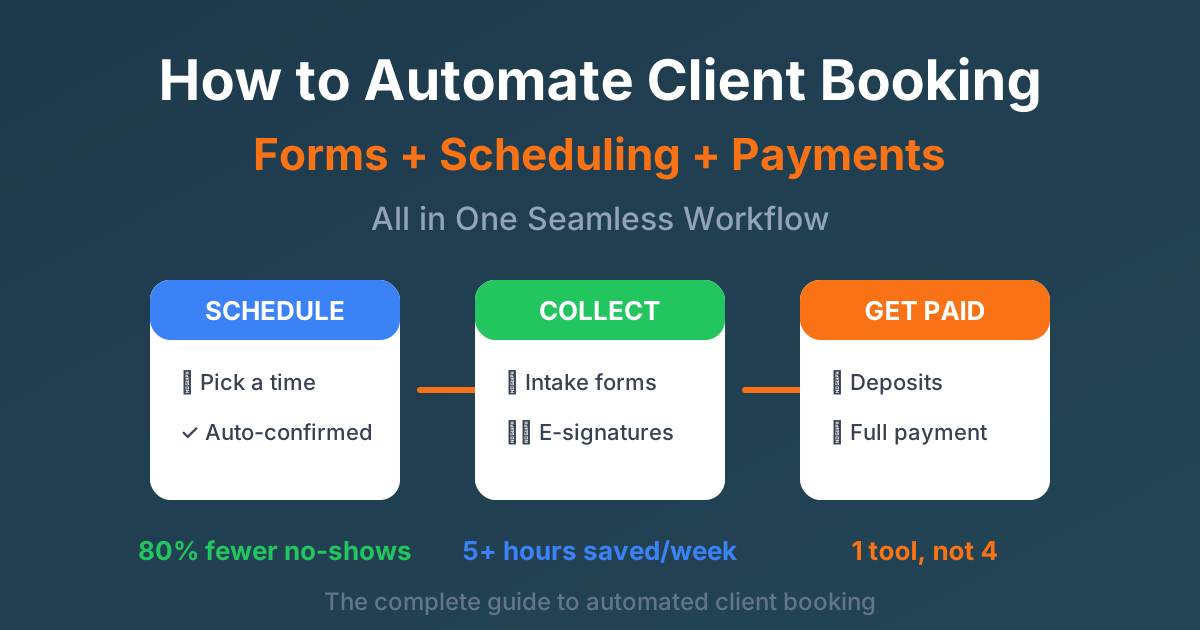
What if every new client could book an appointment, fill out intake forms, and pay their deposit — all before you lift a finger?
For most service-based businesses, the reality looks very different. You're sending Calendly links, then separate intake forms, then chasing payments. Clients forget to complete forms before appointments. No-shows happen because there's no financial commitment. Your data is scattered across 3+ platforms. And manual follow-ups are eating hours of your week.
There's a better way. An all-in-one booking workflow where clients book, fill forms, and pay — in a single seamless experience. Fully automated, zero manual work required.
This comprehensive guide is for anyone who books client appointments:
- Consultants and coaches
- Healthcare providers and wellness practitioners
- Fitness professionals and personal trainers
- Photographers and creative professionals
- Legal and financial advisors
- Service businesses of all types
Let's dive into how to build the perfect automated booking system.
The True Cost of Disconnected Tools
Most businesses piece together their booking workflow from multiple tools. Here's what that typical tech stack looks like:
| Tool | Purpose | Monthly Cost |
|---|---|---|
| Calendly | Scheduling | $12-20 |
| Typeform/JotForm | Intake forms | $25-50 |
| Stripe/Square | Payments | Transaction fees |
| Zapier | Connect them all | $20-50 |
| Total | $77-170+/month |
But the monthly subscription cost is just the beginning. The hidden costs are far more expensive:
Time waste: You're spending 30+ minutes every day on manual tasks — copying data between systems, sending follow-up emails, and chasing incomplete forms.
Client friction: Every additional link you send reduces conversion. Multiple steps = lower booking completion rates.
Data silos: Client information is trapped in different systems. Want to see a client's intake form alongside their appointment? Good luck.
Integration failures: Zapier automations break. Data gets lost. You don't find out until a client shows up and you have no information.
No-show losses: Without a deposit requirement, you're likely experiencing 20-30% no-show rates. That's thousands in lost revenue annually.
What Is an Automated Booking Workflow?
An automated booking workflow combines appointment scheduling, form collection, and payment processing into a single seamless experience. Clients complete everything in one session, and the business receives confirmed, paid appointments with all required information — automatically.
Here's what the ideal client booking flow looks like:
- Client clicks your booking link
- Selects an available time slot
- Fills out intake/consent forms
- Pays deposit or full amount
- Receives automatic confirmation
- Gets reminder before appointment
- You get notified with all details
Zero manual intervention required. The client does everything in one sitting, and you wake up to confirmed, paid appointments with complete information.
Key Features of an All-in-One Booking System
Not all booking software is created equal. Here are the essential features to look for when choosing an automated booking solution:
Smart Scheduling
Your scheduling system needs to be intelligent enough to handle the complexities of real-world availability:
- Real-time availability display — Show only times you're actually free
- Buffer time between appointments — Prevent back-to-back burnout
- Multiple appointment types/durations — 15, 30, 60 minute options
- Timezone auto-detection — Critical for remote consultations
- Calendar sync — Google Calendar, Outlook, iCal integration
- Booking limits — Set max appointments per day or week
Integrated Form Collection
The best booking systems include robust form building capabilities:
- Pre-appointment intake forms — Collect info before the meeting
- Conditional logic — Show/hide fields based on answers
- Required vs optional fields — Ensure you get what you need
- File uploads — IDs, documents, images
- E-signature capture — Consent forms, waivers, contracts
- Security-ready features — Encryption, audit trail, and access controls (platforms vary; verify HIPAA obligations with your legal team)
Payment Processing
Payment integration is what transforms a booking into a commitment:
- Collect deposits or full payment — Flexible pricing options
- Multiple payment methods — Cards, Apple Pay, Google Pay
- Automatic receipts — Professional, branded confirmations
- Refund management — Handle cancellations gracefully
- Payment required to confirm — No payment = no booking
- Stripe integration — Industry-leading payment processing
Automated Communications
Keep clients informed without lifting a finger:
- Instant booking confirmations — Professional, branded emails
- Customizable reminder emails/SMS — Your message, your timing
- 24-hour and 1-hour reminders — Multiple touchpoints
- Reschedule/cancel links — Self-service options
- Post-appointment follow-ups — Nurture the relationship
How to Reduce No-Shows by 80%
No-shows cost businesses $150+ billion annually. They waste your time, hurt your revenue, and throw off your entire schedule. Here's how to virtually eliminate them:
Strategy 1: Require Deposits
Even a small deposit of $10-25 creates psychological commitment. Studies consistently show that deposit requirements reduce no-shows by 80% or more.
The key is to offer a fair refund policy for legitimate cancellations. This protects you from no-shows while maintaining good client relationships.
Strategy 2: Send Multiple Reminders
A single reminder isn't enough. The most effective reminder sequence:
- 48 hours before — Email reminder with appointment details
- 24 hours before — Email + SMS reminder
- 2 hours before — SMS only (high urgency)
Each reminder in this sequence reduces no-shows by an additional 15-25%. Combined, you can achieve 90%+ show rates.
Strategy 3: Make Rescheduling Easy
Here's a counterintuitive insight: a rescheduled appointment is infinitely better than a no-show.
Include clear reschedule links in every reminder. Set a reschedule deadline (e.g., 24 hours before) to maintain control while giving clients flexibility.
Strategy 4: Collect Information Upfront
Clients who invest time filling out intake forms are significantly more committed to showing up. Pre-appointment forms increase show rates by 30% or more.
It's the same psychology as the deposit — when someone invests time, they value the appointment more.
Strategy 5: Confirm Contact Information
Your reminders only work if they're delivered:
- Verify email addresses for confirmation delivery
- Collect phone numbers for SMS reminders (95%+ open rates)
- Use double opt-in for important communications
With Formfy, you get built-in Stripe payments for deposits, automated email + SMS reminders, integrated forms in the booking flow, and easy reschedule functionality — all working together to minimize no-shows.
Industry-Specific Booking Workflows
Different industries have different needs. Here's how to set up the perfect booking workflow for your business:
For Consultants & Coaches
Workflow: Discovery call booking
The goal is to qualify leads while minimizing wasted time on unqualified prospects.
- Appointment options: 15, 30, or 60 minute calls
- Pre-call questionnaire: Goals, challenges, budget, timeline
- Deposit: $50-100 to confirm serious interest
- Confirmation: Calendar invite with video meeting link
- Reminders: 24-hour reminder with prep instructions
Key intake fields: Business type, current challenges, specific goals, budget range, how they found you, best contact method.
For Healthcare & Wellness Providers
Workflow: Patient intake + appointment booking
Healthcare has the most complex requirements due to compliance needs.
- Appointment types: New patient, follow-up, specific procedures
- Intake forms: Complete medical history, current medications, allergies
- Consent: HIPAA consent, treatment consent (e-signatures required)
- Payment: Copay or deposit collection
- Confirmation: Office address, what to bring, arrival instructions
Key intake fields: Medical history, current medications, allergies, insurance information, emergency contact, consent signatures.
For Fitness Professionals
Workflow: Class booking or personal training session
Liability protection is critical for fitness businesses.
- Session types: Group class, personal training, assessment
- Waivers: Liability waiver (legally required, e-signature)
- Health info: Injuries, limitations, fitness level
- Payment: Class fee or session package
- Reminders: What to wear, what to bring
Key intake fields: Fitness goals, injuries or physical limitations, emergency contact, liability waiver signature.
For Photographers & Creatives
Workflow: Session booking with contract
Photographers need style information and legal protection.
- Session types: Headshots, family portraits, wedding consultation
- Questionnaire: Style preferences, inspiration images, location ideas
- Contracts: Photography agreement, model release (e-signatures)
- Deposit: Typically 25-50% of session fee
- Pre-session: Prep guide, what to wear suggestions
Key intake fields: Session goals, location preferences, style inspiration, wardrobe guidance needed, contract signature.
For Legal & Financial Services
Workflow: Consultation booking with conflict check
Professional services need thorough intake for ethical compliance.
- Consultation types: Initial consultation, case review, financial planning
- Conflict check: Questionnaire to identify potential conflicts
- Engagement: Engagement letter or retainer agreement (e-signature)
- Payment: Consultation fee or retainer
- Documents: Relevant file uploads for review
Key intake fields: Matter type, opposing parties (for conflict check), timeline urgency, budget expectations, relevant document uploads.
The Booking Funnel: From Click to Confirmed
Understanding your booking funnel helps optimize conversion at each step:
With a traditional booking flow (no deposit, no forms), you might see 60-70% of booked clients actually show up. With an optimized flow including deposits and forms, that number jumps to 80-90% — a massive improvement in revenue and time utilization.
Step-by-Step: Set Up Your Booking System in 30 Minutes
Ready to build your automated booking workflow? Here's exactly how to do it:
Step 1: Create Your Booking Form (5 minutes)
Start by defining what you're offering:
- Choose your appointment types (consultation, session, meeting)
- Set durations for each type (15, 30, 60 minutes)
- Name and describe each option clearly
- Add any type-specific questions
Pro tip: Keep appointment type names short and action-oriented. "30-Min Strategy Call" is better than "Thirty Minute Initial Business Strategy Consultation Session."
Step 2: Configure Availability (5 minutes)
Set up your calendar:
- Define your working hours (e.g., Monday-Friday, 9am-5pm)
- Block off lunch breaks and personal time
- Add buffer time between appointments (15-30 minutes recommended)
- Set advance booking limits (e.g., must book 24 hours ahead)
- Sync with your existing calendar to avoid double-bookings
Step 3: Add Intake Questions (10 minutes)
Build your intake form:
- Start with standard fields: name, email, phone
- Add industry-specific questions relevant to your service
- Include consent/waiver signatures if needed
- Mark critical fields as required
- Split longer intakes across multiple pages so clients only see what's relevant
Pro tip: Keep forms under 10 fields to prevent abandonment. You can always collect more information later.
Step 4: Enable Payments (5 minutes)
Set up your payment processing:
- Connect your Stripe account (takes 2 minutes)
- Set deposit amount or full session price
- Configure your refund/cancellation policy
- Test the payment flow with a test card
- Review the automatic receipt that clients receive
Step 5: Set Up Reminders (3 minutes)
Configure your reminder sequence:
- Enable email confirmations (always on)
- Add SMS reminders (highly recommended)
- Set reminder timing (48 hours, 24 hours, 2 hours)
- Customize message content with your branding
Step 6: Publish & Share (2 minutes)
Go live:
- Get your unique booking link
- Add it to your website (button or embedded)
- Include in your email signature
- Share on social media profiles
- Add to your Google Business Profile
Total setup time: approximately 30 minutes.
Booking Page Optimization Tips
A great booking system is only effective if people actually use it. Here's how to optimize for conversions:
Design Best Practices
- Mobile-first design — 60%+ of bookings happen on phones
- Clear, professional branding — Your headshot/logo builds trust
- Concise descriptions — Explain what clients get in 1-2 sentences
- Visible pricing — No surprises, builds confidence
- Trust indicators — Testimonials, credentials, certifications
Conversion Optimization
- Limit options — 3-5 appointment types maximum (paradox of choice)
- Action-oriented language — "Book Your Strategy Session" vs "Schedule Meeting"
- Scarcity cues — Show limited availability when appropriate
- Social proof — Include review snippets or client logos
- FAQ section — Answer common objections before they arise
SEO for Your Booking Page
Make your booking page discoverable:
- Custom URL — yourdomain.com/book (not a random subdomain)
- Meta description — Include your main service and location
- Location info — Critical for local service businesses
- Schema markup — LocalBusiness schema for Google rich results
Measuring Success: Key Metrics to Track
What gets measured gets improved. Track these metrics to optimize your booking workflow:
| Metric | Target | Why It Matters |
|---|---|---|
| Booking conversion rate | >70% | Page visitors who complete a booking |
| Form completion rate | >85% | Booked clients who finish intake forms |
| No-show rate | Under 15% | Deposits and reminders working |
| Average booking value | Track trend | Revenue optimization |
| Time to book | Under 3 min | Frictionless experience |
| Reminder open rate | >60% | Communication effectiveness |
Review these metrics monthly and test changes systematically.
Common Booking System Mistakes to Avoid
Learn from others' mistakes:
-
Too many appointment types — Confuses clients and dilutes your SEO. Stick to 3-5 options.
-
No deposit required — Invites no-shows. Even $10 creates commitment.
-
Forms too long — Causes abandonment. Keep initial forms under 10 fields.
-
No reminders — Guaranteed no-shows. Always send at least 2 reminders.
-
Not mobile-optimized — You'll lose 60%+ of potential bookings.
-
Hidden pricing — Destroys trust. Be upfront about costs.
-
No buffer time — Back-to-back appointments lead to burnout and delays.
-
Ignoring timezones — Results in wrong appointment times and frustrated clients.
Why Choose Formfy for Booking Workflows
Formfy provides a true all-in-one solution:
- Visual scheduling builder with real-time availability
- Drag-and-drop form creator with 15+ field types and multi-page support
- Native Stripe integration for deposits and payments
- SMS + email reminder automation
- E-signature collection built-in
- Unlimited bookings on all plans
Compare the cost:
| Feature | Formfy | Calendly + Typeform + Zapier |
|---|---|---|
| Monthly cost | $19/mo | $77+/mo |
| Logins required | 1 | 3+ |
| Integration type | Native | Zaps can break |
| Data location | All in one place | Scattered across tools |
| Support | One team | Multiple vendors |
Start your free 15-day trial — no credit card required. See how Formfy can transform your client booking workflow.
Start Booking Smarter Today
Let's recap what we've covered:
- All-in-one booking eliminates tool sprawl — One system instead of 4-5 disconnected tools
- Deposits reduce no-shows by 80%+ — Financial commitment creates psychological commitment
- Automated reminders ensure clients show up — Multiple touchpoints at the right times
- Pre-appointment forms save consultation time — Come prepared with all the information you need
- One system = one source of truth — All your client data in one place
Ready to stop juggling tools and start booking smarter?
Related reading:
Formfy Team
Product Team
Related Articles

Music Teacher Service Forms: Lesson Agreement, Recital Authorization, and Minor Consent
Music teacher service forms cover tuition, instrument rental, recital release, and minor pickup consent. Learn what private studios should capture digitally.
Employee Leave Request Forms: FMLA, PTO, and State-Mandated Leave Workflows
Employee leave request forms cover PTO, FMLA, state paid family leave, ADA accommodation, intermittent leave, and HIPAA-compliant medical certification handling.
Employee Liability Waivers: Wellness Programs, Off-Duty Activities, and Equipment Acknowledgment
Employee liability waivers cover wellness programs, company outings, BYOD equipment, vehicle use, and the workers' comp vs personal-activity distinction.