
Digital Forms & Waivers for Fitness Studios and Gyms
How fitness studios use digital waivers, membership forms, and online booking to streamline operations and improve member experience.
Formfy Team
Product Team
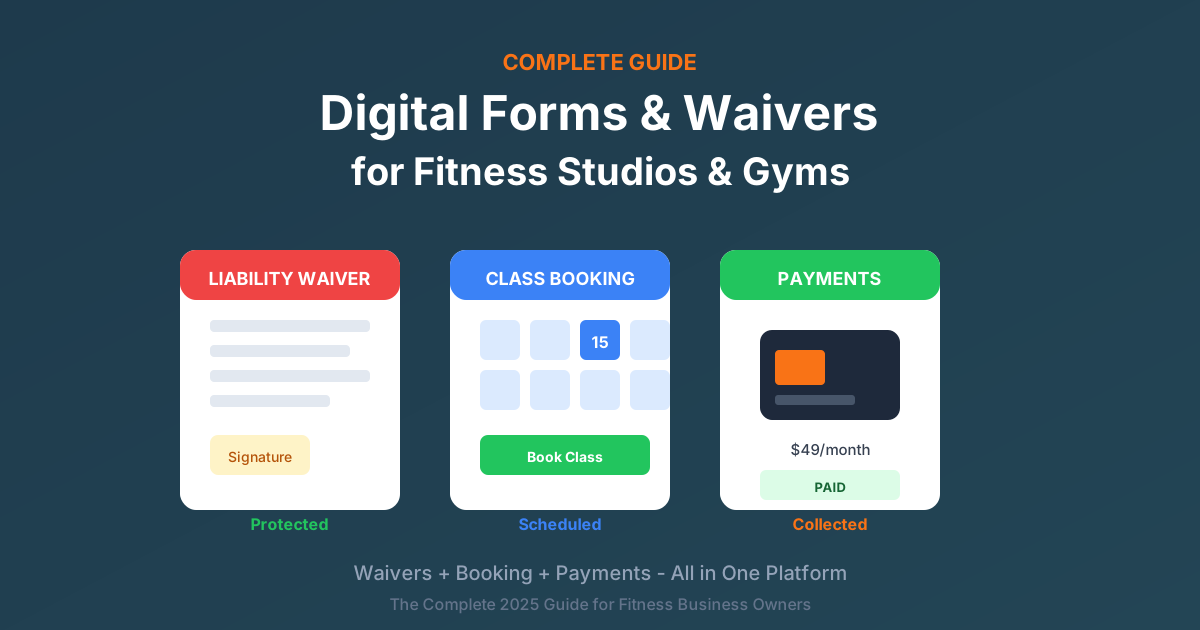
Running a fitness studio means juggling memberships, class schedules, liability protection, and member experience — often with paper forms scattered everywhere and filing cabinets overflowing with waivers that may or may not be findable when you need them.
The fitness industry has unique requirements that make digital solutions essential:
- Liability waivers are legally essential — Every member needs one before participating
- Member intake captures health information — Medical conditions, injuries, medications
- Class bookings need to be seamless — Real-time availability, easy cancellation
- Payments need to flow smoothly — Memberships, packages, drop-ins
- Everything needs to work on mobile — Members expect to complete forms on their phones
This guide covers everything fitness business owners need to know about going digital with forms, waivers, and booking.
Who this guide is for:
- Gym owners and managers
- Fitness studio operators
- Yoga and Pilates studios
- CrossFit box owners
- Personal trainers
- Martial arts schools
- Dance studios
- Wellness centers
Why Fitness Businesses Need Digital Waivers
The Liability Reality
Fitness activities carry inherent risk. Members can and do get injured — from minor strains to serious accidents. Without proper waivers, you're exposed to lawsuits that could devastate your business.
Consider these real scenarios that happen regularly:
- Member injures themselves during a class exercise
- Equipment malfunction causes an accident
- Pre-existing condition wasn't disclosed
- Minor participant was signed up without proper guardian signature
- Member from three years ago sues, and their waiver can't be found
Paper waivers create problems:
- They get lost in filing cabinets
- They're damaged by water, fire, or simple wear
- Signatures are often illegible
- Information is incomplete
- Finding a specific waiver takes minutes or hours
- No proof of exactly when it was signed
How Digital Solves This
Digital waivers eliminate every paper problem:
- Every waiver is timestamped — You know exactly when it was signed
- Complete audit trail — IP address, device, browser all recorded
- Instant search — Find any member's waiver in seconds
- Automatic backups — Documents never lost
- Clear signatures — No illegibility issues
- Better legal protection — Digital audit trails often hold up better in court
Essential Forms Every Fitness Business Needs
Most fitness businesses need at least these six forms:
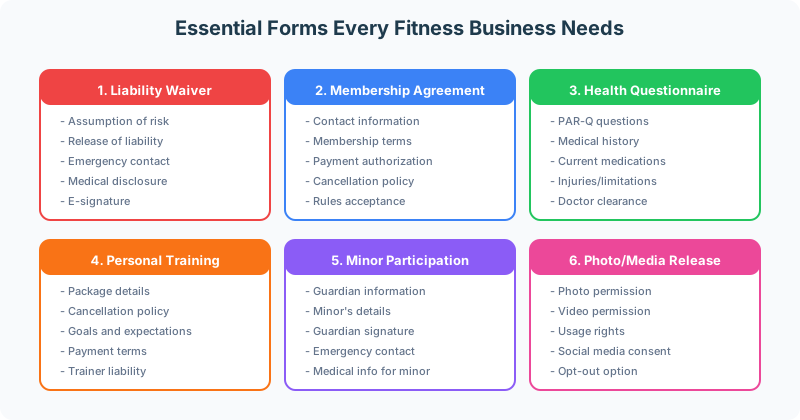
1. Liability Waiver / Release Form
The most critical document. This form:
- Acknowledges the assumption of risk
- Releases your business from liability claims
- Captures emergency contact information
- Discloses relevant medical conditions
- Collects a legally binding signature
2. Membership Agreement
For recurring memberships, you need:
- Member contact information
- Membership type and terms
- Payment authorization
- Cancellation policy acceptance
- Facility rules acknowledgment
3. Health Questionnaire (PAR-Q)
The Physical Activity Readiness Questionnaire helps identify members who need medical clearance:
- Heart condition questions
- Current medications
- Recent surgeries or injuries
- Pregnancy status (if applicable)
- Any doctor restrictions on exercise
4. Personal Training Agreement
For 1-on-1 training services:
- Training package details
- Session scheduling and cancellation policies
- Payment terms
- Trainer liability acknowledgment
- Goals and expectations
5. Minor Participation Form
For members under 18:
- Parent/guardian information
- Minor's details and date of birth
- Guardian signature (not the minor's)
- Medical information for the minor
- Emergency contact
6. Photo/Media Release
For marketing purposes:
- Permission to photograph and video
- Usage rights for social media and marketing
- Clear opt-out option
- Signature
The Member Onboarding Flow
The best fitness businesses create a seamless onboarding experience. Here's the ideal flow:
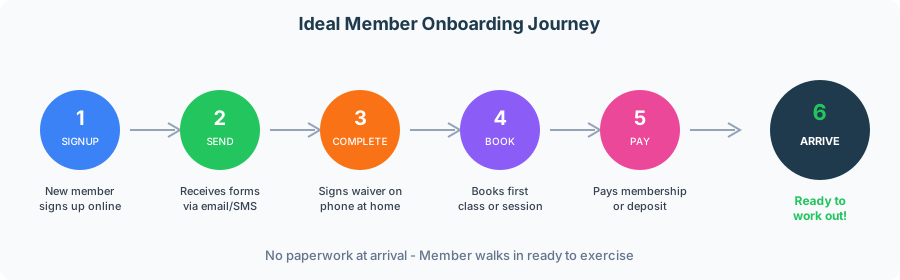
Why This Flow Works
For members:
- Complete paperwork at home, on their own time
- Arrive at the gym ready to exercise
- No waiting in line to fill out forms
- Professional first impression
For your business:
- Staff doesn't waste time processing paperwork
- All information captured accurately (no illegible handwriting)
- Payment secured before first visit
- Reduced no-shows (investment made)
How to Implement This Flow
- Capture email or phone at signup — This is all you need initially
- Send forms immediately — Automatic email or SMS with waiver link
- Require completion before booking — System blocks class booking without signed waiver
- Collect payment with booking — First month or session fee
- Send confirmation and reminder — What to bring, where to go
Fitness Waiver Best Practices
Your liability waiver is your primary legal protection. Here's how to structure it effectively:
Section 1: Participant Information
Collect:
- Full legal name
- Date of birth (important for minors)
- Current address
- Phone and email
- Emergency contact name and phone number
Section 2: Health Disclosure
Ask about:
- Current medical conditions
- Recent surgeries or injuries (past 12 months)
- Medications that affect physical activity
- Pregnancy status (when relevant)
- Any doctor restrictions on exercise
Important: This section helps you identify members who may need modifications or medical clearance. It also documents that you asked.
Section 3: Assumption of Risk
Clear language stating the participant:
- Understands fitness activities involve inherent risk
- Acknowledges specific risks (injury, muscle strain, cardiovascular stress)
- Accepts responsibility for their own health and fitness level
- Agrees to follow safety instructions from staff
Section 4: Release of Liability
This section:
- Releases your gym/studio from liability
- Covers employees, trainers, and agents
- Includes negligence clause (where legally permitted in your state)
- Covers use of all equipment and facilities
Section 5: Agreements and Acknowledgments
The signer confirms they:
- Agree to follow facility rules
- Confirm all provided information is accurate
- Confirm physical capability to participate
- For minors: acknowledge signing on behalf of the minor
Section 6: Signature
- Electronic signature capture
- Auto-filled date and time
- Printed name confirmation
Legal Tips for Fitness Waivers
- Have an attorney review your waiver — Laws vary by state
- Use clear language — Avoid excessive legal jargon
- Include specific activities — List the types of exercise offered
- Update annually — Or whenever offerings change significantly
- Keep signed waivers for 7+ years — Longer for minors
Personal Training Waivers and Agreements
One-on-one training requires additional documentation beyond the standard gym waiver.
What Personal Training Agreements Need
In addition to standard waiver elements:
- Training package details — Number of sessions, expiration date
- Cancellation/no-show policy — Typically 24-48 hour notice required
- Rescheduling policy — How many times, how far in advance
- Rate and payment terms — Per session cost, payment schedule
- Session duration — 30, 45, 60 minutes
- Trainer responsibilities — What you commit to providing
- Client responsibilities — Arrive on time, communicate issues, follow instructions
Protecting Trainers from Liability
Include language that:
- Client acknowledges trainer is not a medical professional
- Client will communicate pain or discomfort immediately
- Client is responsible for proper form when training independently
- Results are not guaranteed
- Trainer may decline to train if client appears impaired
Class Booking and Scheduling Integration
For studios offering classes, integrated booking is essential.
Why Booking Matters for Fitness
- Classes have capacity limits — Safety and experience require limits
- No-shows waste reserved spots — Other members couldn't book
- Last-minute cancellations hurt revenue — Especially for small classes
- Waitlists maximize attendance — Fill spots from cancellations
- Recurring bookings build habits — Members who book weekly stay longer
Ideal Class Booking Features
| Feature | Why It Matters |
|---|---|
| Real-time availability | Members see accurate spot counts |
| Easy mobile booking | Most bookings happen on phones |
| Automatic confirmations | Members know booking worked |
| Reminder emails/SMS | Reduce no-shows |
| Easy cancel/reschedule | Respects members' time |
| Waitlist management | Fills spots automatically |
| Recurring booking option | Builds member habits |
Connecting Waivers to Booking
The best systems integrate waivers with booking:
- Require waiver completion before first booking — No signed waiver, no class
- Block booking if waiver expired — Force renewal before next class
- Automatic renewal reminders — Email members before expiration
- Seamless experience — Member doesn't notice the requirement
Payment Collection for Fitness Businesses
Payment scenarios in fitness are varied:
- Monthly membership dues
- Class packages (10-pack, 20-pack)
- Drop-in class fees
- Personal training packages
- Merchandise sales
- Late cancellation fees
Collecting Payments with Forms
Integrate payment with your forms:
- Membership signup — First month collected at registration
- Package purchase — Payment with class package selection
- Deposit to reserve PT sessions — Reduces no-shows
- Automatic recurring billing — Monthly memberships
Benefits of Integrated Payments
- No chasing payments — Collected upfront
- Reduce no-shows — Members have skin in the game
- Automatic receipts — Professional and convenient
- Clear payment records — Easier accounting
- One less tool — No separate payment processor login
Simplifying Your Tech Stack
Many fitness businesses use multiple separate tools for different functions. This creates complexity and cost.
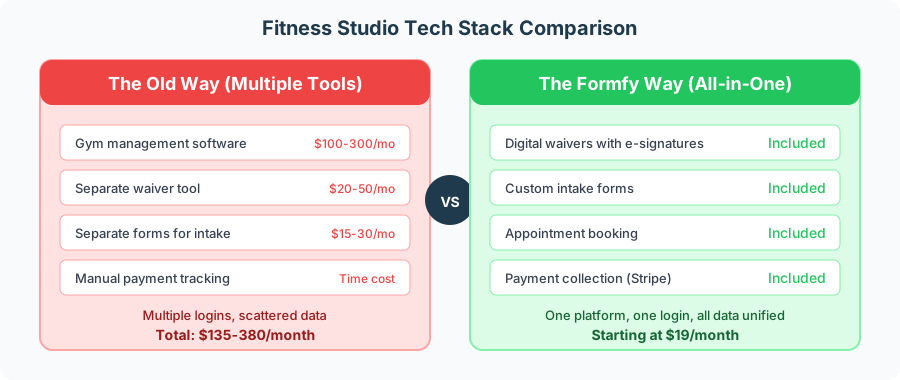
The Problem with Multiple Tools
- Multiple subscriptions — Costs add up quickly
- Multiple logins — Staff waste time switching systems
- Data silos — Member info scattered across platforms
- Integration headaches — Tools don't talk to each other
- Training complexity — Staff need to learn multiple systems
The All-in-One Advantage
When forms, waivers, booking, and payments live in one platform:
- Single monthly cost — Predictable, usually lower
- One login — Everything in one place
- Unified data — Complete member picture
- Seamless workflows — Sign waiver → book class → pay
- Easier staff training — Learn one system
Industry-Specific Use Cases
Different fitness businesses have different needs. Here's what to consider for your specialty:
Yoga Studios
Key forms needed:
- Health questionnaire focused on injuries and limitations
- Liability waiver covering yoga-specific risks
- Class package purchase forms
- Workshop and retreat registration
- Teacher training applications
- Drop-in waivers for visitors
Special considerations:
- Many students have injuries requiring modifications
- Hot yoga needs additional health acknowledgments
- Workshops often require deposits
CrossFit Boxes
Key forms needed:
- Comprehensive liability waiver (high-intensity activities)
- Foundations/OnRamp program registration
- Competition and event sign-ups
- Open gym waiver for independent workouts
- Drop-in athlete forms for visitors
Special considerations:
- Higher injury risk requires robust waiver language
- Competition forms need additional acknowledgments
- Drop-ins from other boxes need verification
Personal Training Studios
Key forms needed:
- Detailed health and fitness assessment
- Goal-setting questionnaire
- Training agreement with policies
- Progress tracking consent
- Nutrition disclaimer (if offering guidance)
Special considerations:
- More detailed health history needed for 1-on-1 work
- Package expiration policies need clear documentation
- Session notes may require additional consent
Martial Arts Schools
Key forms needed:
- Sparring consent forms
- Competition and tournament waivers
- Minor enrollment with guardian signatures
- Belt testing registration
- Trial class waivers
Special considerations:
- Contact activities need explicit sparring consent
- Many students are minors
- Competition waivers are separate from regular training
Dance Studios
Key forms needed:
- Performance and recital consent
- Photo and video release for performances
- Costume measurement forms
- Minor participation forms
- Summer camp and intensive registration
Special considerations:
- Recitals require additional media releases
- Costume and fee collection happens periodically
- Many students are minors
Wellness Centers
Key forms needed:
- Service-specific consent (massage, acupuncture, etc.)
- Detailed health intake questionnaires
- HIPAA compliance forms (if providing healthcare services)
- Membership agreements
- Package purchase forms
Special considerations:
- May need HIPAA compliance depending on services
- Different consent for different services
- More detailed health intake required
Handling Minors in Fitness Settings
If you serve participants under 18, you need special procedures.
Legal Reality
- Minors cannot sign contracts — Waivers signed by minors may not be enforceable
- Parent or guardian MUST sign — On behalf of the minor
- Some states limit waiver enforceability for minors — Even with parent signature
- Records must be kept longer — Until minor reaches adulthood plus statute of limitations
Form Requirements for Minors
Your minor participation form must include:
- Guardian's full name and relationship to minor
- Guardian's contact information
- Minor's full name and date of birth
- Guardian's signature (explicitly, not the minor's)
- Clear language that guardian is signing on behalf of minor
- Emergency contact (may be different from guardian)
- Minor's medical information
Best Practices for Minor Waivers
- Verify guardian relationship — When possible at check-in
- Include both parents — If custody is shared
- Update annually — As child ages and circumstances change
- Keep records extra long — Until adulthood plus 7 years minimum
- Consult an attorney — Your state may have specific requirements
Mobile-First: Why It Matters for Fitness
Your members live on their phones. Your forms need to work perfectly there.
Member Behavior Reality
- 70%+ complete forms on phones — Not laptops or tablets
- Members want to sign up from anywhere — Home, work, on the go
- Quick, easy experience expected — Comparable to other apps
- Clunky forms = abandoned sign-ups — Lost revenue
Mobile-Friendly Form Requirements
- Responsive design — Adapts to any screen size, not just "works"
- Large tap targets — Buttons easy to press with thumbs
- Easy signature on touchscreen — Sign with finger
- Minimal typing required — Dropdowns and checkboxes where possible
- Quick load times — Under 3 seconds
- No zooming or horizontal scrolling — Automatic fit
SMS for Fitness Businesses
Text messaging is powerful for fitness:
- Send waiver link via text — Higher open rate than email
- Class reminders — Reduce no-shows significantly
- Waitlist notifications — "A spot opened up!"
- Payment reminders — For failed cards
- Instant delivery — Members always have phones with them
Compliance and Data Security
You're collecting sensitive information. Here's what you need to know:
E-Signature Compliance
Under ESIGN Act and UETA:
- Electronic signatures are legally binding
- You need proper consent to the electronic process
- You must maintain records appropriately
- Audit trails are required for legal validity
Data You're Collecting
Be aware you're handling:
- Personal information (PII) — Names, addresses, contact info
- Health information — Medical conditions, injuries
- Payment information — Credit card data
- Emergency contacts — Third-party information
Security Requirements
Your waiver software should provide:
- Encrypted storage — Data protected at rest
- Encrypted transmission — SSL/TLS for all data transfer
- Access controls — Staff see only what they need
- Regular backups — Protected against data loss
- Data retention policies — Clear rules on how long data is kept
HIPAA Considerations
Standard fitness waivers are generally NOT HIPAA covered. However:
- If you offer healthcare services (licensed PT, registered dietitian nutrition counseling), you may need HIPAA compliance
- Collecting medical information for fitness purposes is different from providing healthcare
- When in doubt, consult a healthcare compliance professional
Getting Started: Implementation Checklist
Ready to go digital? Follow this timeline:
Week 1: Preparation
- Audit all current forms and waivers you use
- List every form type needed for your business
- Have an attorney review your waiver language
- Choose your digital platform
- Set up account and add your branding
Week 2: Build Forms
- Create your liability waiver
- Create membership agreement
- Create health questionnaire
- Create specialty forms (PT agreement, minor forms, etc.)
- Test all forms thoroughly on mobile devices
Week 3: Set Up Workflows
- Configure email notifications for new submissions
- Set up SMS delivery if available
- Create booking integration if using scheduling
- Connect payment processing
- Train all staff on the new system
Week 4: Launch
- Update website with new form links
- Create QR codes for in-studio tablet/kiosk use
- Announce the change to existing members
- Start using for all new members immediately
- Keep paper backup process available during transition
Why Fitness Businesses Choose Formfy
Formfy is built for fitness operations that need more than just waivers:
Digital Waivers: Legally binding e-signatures with complete audit trails. Members sign on any device, and you find any waiver instantly.
Custom Form Builder: Create health questionnaires, PT agreements, registration forms, and any other forms your business needs.
Appointment Scheduling: Built-in booking so members can schedule sessions and classes as part of the signup flow.
Payment Collection: Collect membership fees, package payments, and deposits through Stripe integration.
SMS Delivery: Send waiver links via text for higher completion rates.
All Data in One Place: Every form, waiver, booking, and payment in a single dashboard.
Perfect for:
- Gyms and fitness centers
- Yoga and Pilates studios
- Personal training businesses
- CrossFit boxes
- Martial arts schools
- Dance studios
- Wellness centers
Starting at $19/month with unlimited signatures.
Common Questions About Fitness Waivers
Summary
Digital forms and waivers are essential for modern fitness businesses:
- Better legal protection — Digital audit trails often hold up better than paper
- Essential forms — Liability waiver, membership agreement, health questionnaire at minimum
- Mobile-first — 70%+ of members complete forms on their phones
- Integrated booking and payments — Streamline the entire member experience
- Long retention — Keep waivers 7+ years (longer for minors)
- All-in-one platforms — Simplify operations and reduce costs
Ready to modernize your fitness business paperwork?
Formfy Team
Product Team
Related Articles

How to Choose Digital Waiver Software for Your Fitness Studio: A Feature Buying Guide
Evaluate digital waiver software for your gym or studio. Feature checklist covering risk language, screening, guardian flows, upload conversion, and signatures.
Acupuncture and Holistic Health Intake Forms: Build Complete Consent and Screening Workflows for Wellness Practices
Build complete acupuncture intake forms with TCM diagnostic screening, medication checks, contraindication logic, multi-modality consent, and e-signatures.
How to Digitize Daycare Registration Forms (Enrollment, Consent & Pickup Auth)
Step-by-step guide to digitizing daycare enrollment forms. Covers registration, guardian consent, medical history, allergy disclosures, and pickup authorization — all in one digital packet.